DocsFeatures
Revenue integrations
Connect RevenueCat, Adapty or App Store Server Notifications so trials, renewals and refunds reach your onboarding funnel with no extra code in your app.
Your app can report trial_start and purchase itself, and that already closes the onboarding funnel. But the app only sees the moment of purchase. Renewals, refunds, cancellations and trials that convert days later happen on the store's side. A revenue integration fills that in: your payment provider sends ASO Atlas a webhook for every event, and it lands on the install that made the purchase.
Three providers are supported: RevenueCat, Adapty and App Store Server Notifications (Apple's own, for App Store and Mac App Store apps). Google Play purchases arrive through RevenueCat or Adapty.
Connecting a provider
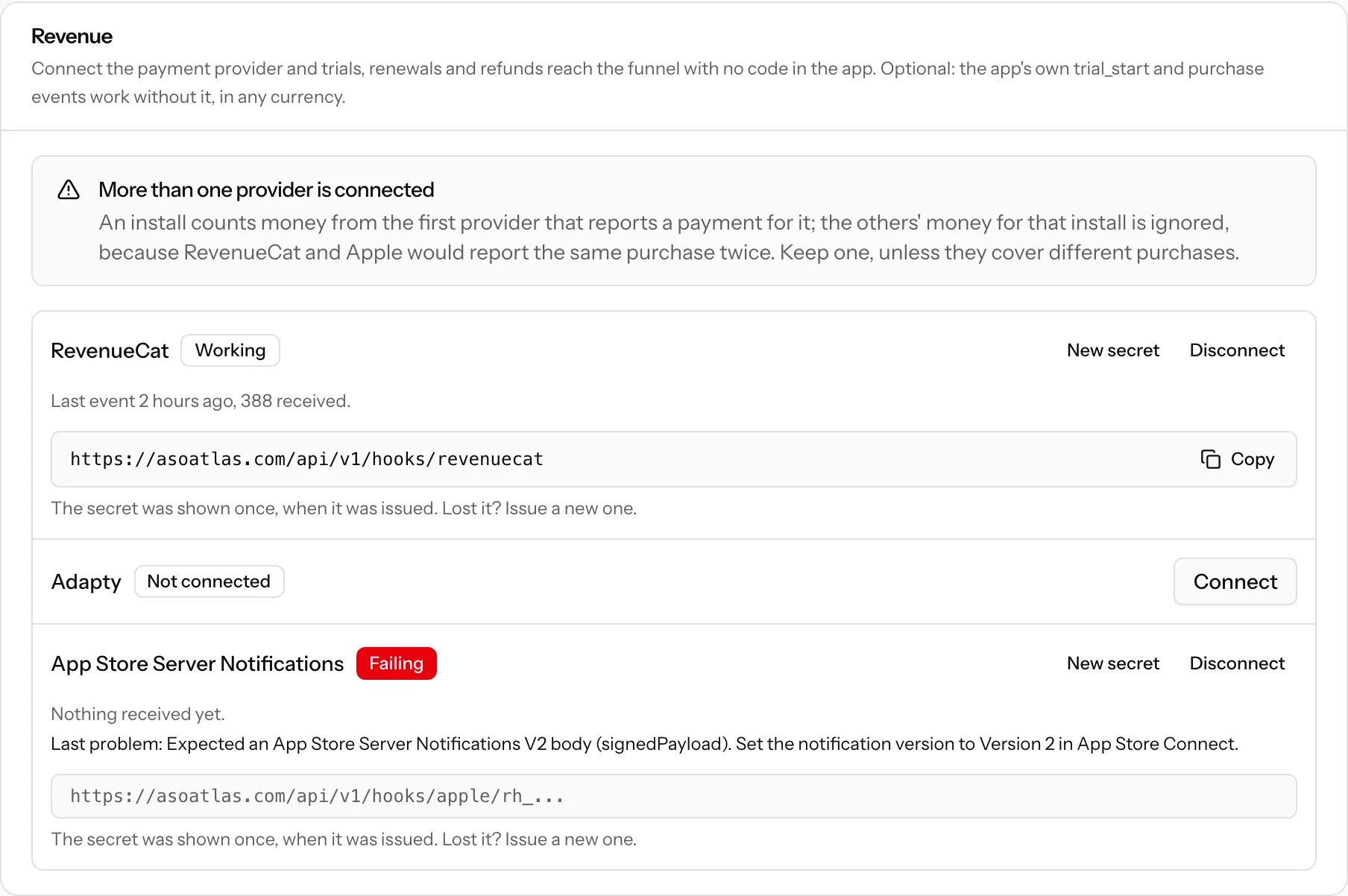
Open the app's Setup tab under Analytics and find the Revenue card. Click Connect next to the provider. ASO Atlas shows a webhook URL and a secret starting with rh_. Copy them right away: the secret is shown only once. Lost it? New secret issues another, and the old one stops working at once, so paste the new one into the provider right after.
RevenueCat
In RevenueCat, open Project settings, Integrations, Webhooks and add a webhook:
- Webhook URL:
https://asoatlas.com/api/v1/hooks/revenuecat - Authorization header value: the
rh_secret
In your app, set the subscriber attribute asoatlas_install_id to the install id after Purchases.configure, and again whenever the install id changes.
Adapty
In Adapty, open App settings, Integrations, Webhook:
- Paste
https://asoatlas.com/api/v1/hooks/adaptyas both the production and the sandbox endpoint, and therh_secret as the Authorization header value in both. - Turn on sending user attributes, and keep Adapty's default event names (renamed events are acknowledged and ignored).
In your app, set the custom attribute asoatlas_install_id to the install id. Adapty checks the URL when you save it, and ASO Atlas answers that check only for this app's secret.
App Store Server Notifications
In App Store Connect, open your app, App Information, App Store Server Notifications, and paste the URL ASO Atlas gave you as both the Production and the Sandbox Server URL, with Version 2. Apple cannot send headers, so the secret is part of that URL; treat the whole URL as a secret.
Every notification is checked against Apple's signature, and it must name your app; one for another app is refused and shown as the last problem. If RevenueCat already receives your App Store notifications, keep it there and use RevenueCat's notification forwarding to send them on to the ASO Atlas URL.
How purchases find the right install
A webhook is only useful when it lands on the install that bought. ASO Atlas links each event in this order:
- The install id the provider carried: RevenueCat's or Adapty's
asoatlas_install_idattribute, or Apple'sappAccountToken. For StoreKit 2, buy with the install id as the account token:product.purchase(options: [.appAccountToken(installUUID)]). Apple requires a UUID there, which is why the install id is one. The Swift code on the Setup tab exposes it asinstallUUID. If your app already sets its ownappAccountToken, keep it and rely on the next step. - Your app's user id: RevenueCat's app user id and aliases, or Adapty's customer user id, matched against the
user_idyour app sends after sign-in. - The same subscription: once one event of a subscription is linked, from any provider, its renewals and refunds follow it.
An event that matches nothing yet is kept, counted as unmatched, and linked as soon as the install it names, or an install with that user id, shows up. The AI prompt on the Setup tab adds the attribute or the account token for you.
What a provider changes in the funnel
- Trials and payments: trial starts, first payments and trial conversions set the install's trial and paid stages, at the time the provider reports.
- Revenue: each payment adds to the install's revenue and a refund takes away what it actually refunded; a reversed refund gives it back. Revenue is shown in US dollars. RevenueCat and Adapty report a US dollar value for every currency; App Store notifications carry the local price, which ASO Atlas converts at the exchange rate of the day the purchase was made (a refund uses its purchase's day, so it takes back what the purchase added). A currency without a published exchange rate counts the payment but adds no amount.
- Cancellations are recorded on the install, and a renewal turned back on clears them. Expirations are stored but change nothing in the funnel.
- Your app's own events still count. A client
purchaseplaces the payment in the funnel at once, and the provider's figures replace the client's price when they arrive. - Sandbox purchases are stored but never counted in any tab. The test notifications RevenueCat and Apple send from their settings are only acknowledged.
- Nothing is recorded while the app is not collecting. When analytics is turned off or paused for the app, or your plan has lapsed past the grace period, webhooks are acknowledged (so the provider does not keep retrying) and dropped, like your app's own events. Purchases made in that time do not come back later.
- One project, several apps. If one RevenueCat or Adapty project serves your app on more than one store (App Store, Mac App Store, Google Play), connect it in each app with that app's secret. Each app keeps only the purchases from its own store and acknowledges the rest. Adapty does not tell the Mac App Store from the App Store, so with Adapty both Apple apps get the Apple purchases.
One money provider per install
RevenueCat and Apple would report the same App Store purchase twice. So the first provider that reports money for an install owns that install's revenue, and money from another provider is ignored for it; their dates still count. The Revenue card warns when an app has more than one provider connected. Keep one, unless they cover different purchases.
Checking the connection
Each provider on the Revenue card has a status:
- Not connected, or Waiting for the first event once connected.
- Working: events arrive, with the time of the last one and how many were received.
- Failing: the last attempt was refused, with the problem as it happened, for example a notification sent as Version 1 instead of Version 2, or for another app.
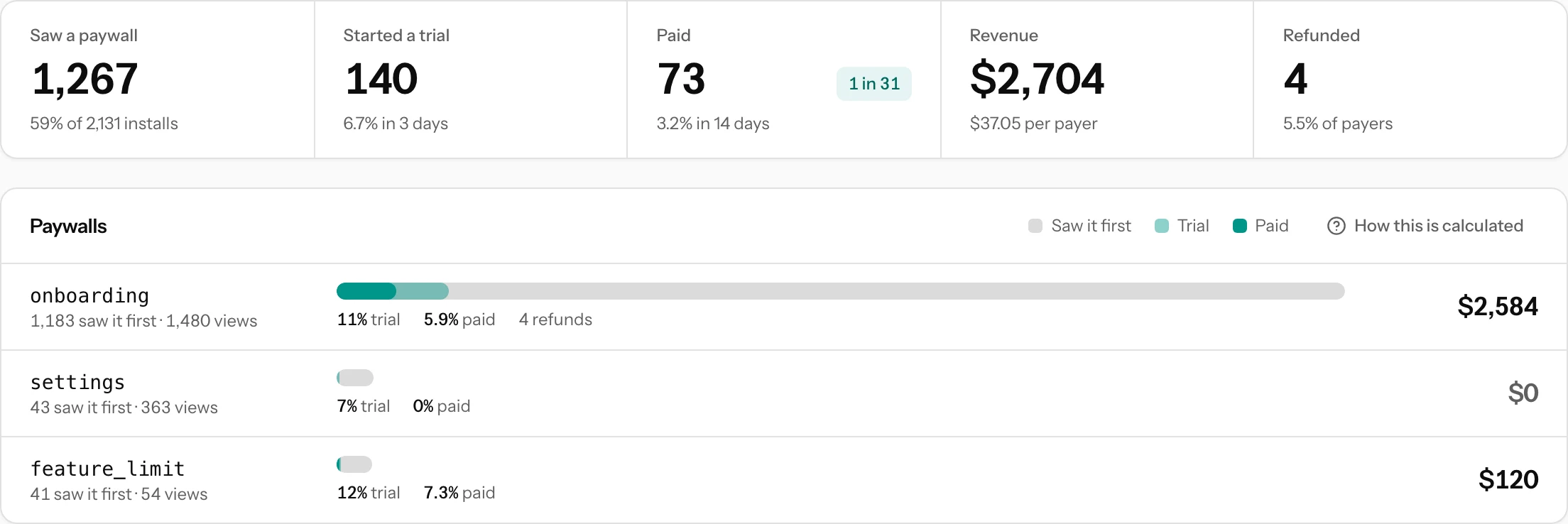
The Paywall & revenue tab repeats this under Revenue sources: one chip per provider with a status dot and the revenue it brought, and an In-app events chip for what your app reported itself. Hover a chip for the last event and the events received. A provider you disconnected keeps a dashed chip with the revenue it reported before. Under the chips, a failing provider's last problem is spelled out, and so are events that are not linked to an install yet.

Disconnecting
Disconnect refuses that provider's webhooks from then on. Revenue it already reported stays on your installs. When you delete a user's data, their purchases stay in your totals without their user id, installation id or subscription id. A later renewal of that subscription then stays unmatched unless it carries an install id or user id of its own.
Your AI assistant can connect a provider too, once you connect it to ASO Atlas. It gets the secret once, just like the Setup tab.