DocsFeatures
Review insights
See your rating trend, read the latest reviews and learn what users love or complain about. How ASO Atlas turns review text into ASO decisions.
Every tracked app has a Ratings & reviews tab that keeps your rating, your latest customer reviews and an automatic analysis of what those reviews actually say in one place. It answers three questions: how is my rating moving, what are customers telling me, and what should I do about it.
Why reviews matter for ASO
Your star rating is not just a vanity number. It works on both sides of the ASO equation:
- Ranking. Rating and rating volume feed the search algorithm. Two apps with similar metadata rarely tie: the better-rated one tends to sit higher.
- Conversion. The rating is printed right in the search results, before anyone opens your page. A 4.7 and a 3.9 get very different tap-through rates for the same position.
On top of that, reviews are the only place where users describe your app in their own words. Those words are search queries waiting to be discovered.
The ratings summary
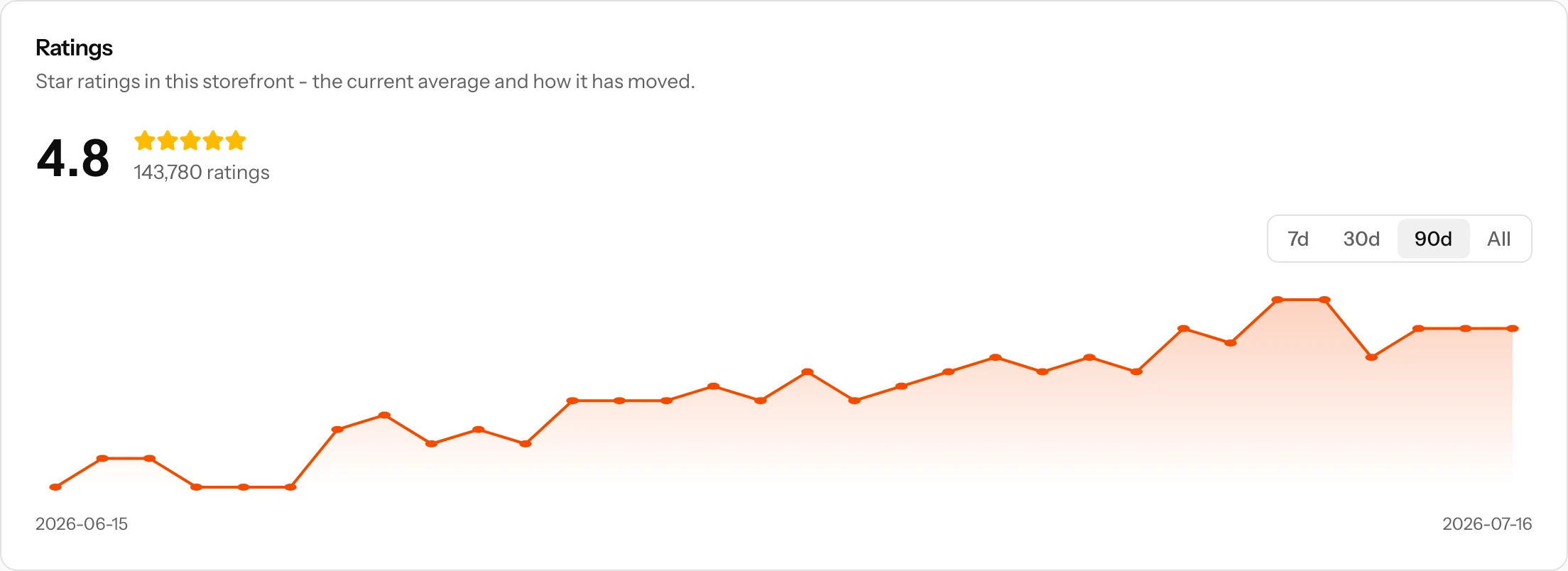
The top card shows the current state of your rating in the tracked storefront: the average as a big number, the star row, and the total count of ratings. Below it, a trend chart plots the average rating over time with a range selector (7, 30, 90 days or the full history), so a slow slide or a recovery after a bad release is visible at a glance. The chart appears once ASO Atlas has collected at least two daily snapshots, so give a freshly added app a couple of days.
Recent reviews
The middle card lists the latest written reviews from your tracked storefront: stars, title, full text, author, the app version it was written against and how long ago it was posted. Star-only ratings without text do not appear here - only reviews where the customer actually wrote something.
Reviews sync automatically every day together with the rest of the app's store data. Need them right now, for example after replying to a wave of complaints? Hit Refresh on the app page.
What the insights show
The Review insights card is where the reading gets done for you:
- Star distribution. A bar per star level, 5 down to 1, with counts, plus the average across all analyzed reviews. A polarized mix (lots of 5s and lots of 1s) tells a different story than a uniform 3.8.
- Loved. The words and phrases that recur across positive reviews (4 and 5 stars), each with how often it appeared.
- Complaints. The same analysis over negative reviews (1 and 2 stars).
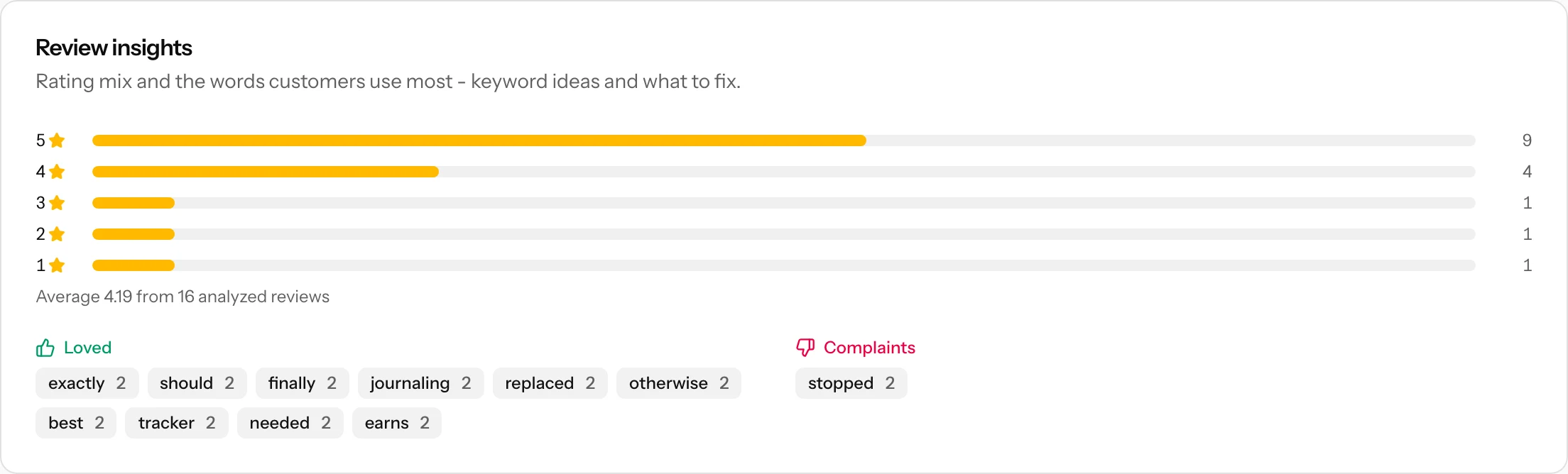
Under the hood, the analysis takes your most recent reviews (up to 200), splits them by rating, and counts the meaningful words and two-word phrases in each group, dropping filler words and anything that only appears once. Three-star reviews are deliberately left out of both lists: mixed feedback muddies the signal. What survives is language that multiple customers independently chose.
Acting on what you find
The two term lists point in opposite directions, and both are useful:
- Loved terms are keyword candidates. If several reviews praise "widgets" or "streak tracking", that is the vocabulary real users associate with your app. Run those terms through keyword research - you convert well for searches you are praised for.
- Complaints are a prioritized fix list. Recurring negative terms ("crashes", "sync", "subscription") show what is costing you stars. Fix the top one first: it is the complaint most customers share.
- Reply to negative reviews. A response in App Store Connect can turn an updated review, and it signals to everyone reading that you are alive.
- Watch the trend to confirm. After a fix or an outreach push, the rating trend chart is your scoreboard. A recovering average validates the effort; a flat line says the real problem is still out there.
Where to go next
- Rank tracking: the rating you just improved lifts the keywords you track.
- Reading the dashboard: where your apps' ratings show up in the daily overview.