DocsFeatures
The Mac app
ASO Atlas ships as a native macOS app. What it covers, how to install and sign in, how offline mode works, and what stays web-only.
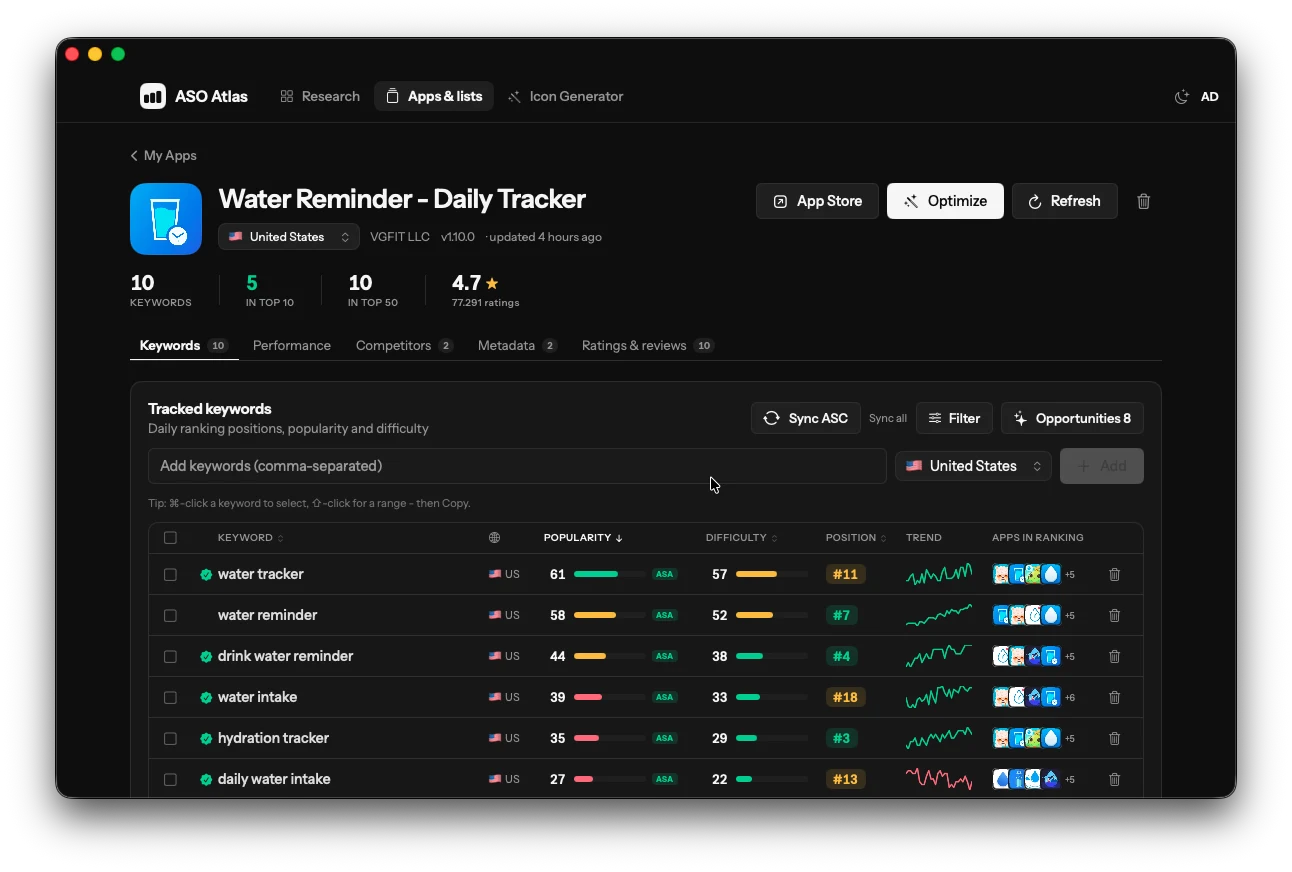
ASO Atlas is also a native Mac app: the same keyword research, rank tracking and opportunity scoring as the web app, built with SwiftUI for macOS rather than wrapped in a browser. It launches instantly, follows your system appearance and is included with every subscription at no extra cost.
What the Mac app covers
Almost everything you do on the web works in the Mac app:
- Keyword research: look up any keyword's popularity, difficulty and the apps currently ranking for it, plus related suggestions, in any storefront.
- Tracked apps and keywords: add apps, add or remove keywords, switch countries, trigger a refresh and review the daily rank tracking history with metadata change markers.
- Competitors: follow rival apps next to your own and open any keyword to see who ranks for it.
- Keyword lists: create, edit and organize lists exactly as on the web.
- Metadata optimizer: review and edit your draft title, subtitle and keyword field per app.
- Keyword history (1.6 and later): the keyword field of every version of your own apps, notes on each keyword and a warning when you type one you already dropped. With your Admin key on the Mac it needs no extra setup.
- Google Play (1.6 and later): track and research your Android apps next to your iOS ones, with demand shown as a band.
- Icon generator: generate and browse icon concepts.
- Performance: connect App Store Connect and your downloads, impressions, subscriptions and revenue appear alongside your keyword work, same data as the web dashboard.
Two things make it feel like a real Mac app rather than a port. It works offline: your keyword history and app data are cached locally, so you can review positions and trends without a connection (adding keywords, refreshing ranks and other live actions still need one). And it updates itself: new versions install in place with one click, no re-downloading and no App Store queue.
Download and install
Grab the DMG from the product page or directly at /download/mac. Open ASOAtlas.dmg, drag ASO Atlas to Applications, and you are done.
Requirements and safety:
- macOS 14 Sonoma or later, on Apple silicon or Intel.
- Every release is code-signed with an Apple Developer ID and notarized by Apple, so macOS verifies it before it runs. Updates are cryptographically verified before they install.
Signing in
The Mac app uses your regular ASO Atlas account: sign in with the same email and password you use on the web. No account yet? You can create one right in the app, or follow the quick start on the web first and sign in afterwards; either way you land in the same workspace. Your apps, keywords, lists and history are shared between the two, so you can add a keyword on your Mac at your desk and check its trend from a browser anywhere else.
If your subscription has lapsed, the app will let you sign in and then point you to the web to sort out billing.
A sign-in lasts six months, after which the app asks for your password again. Changing or resetting your password signs the Mac app out straight away, on purpose: it is the fastest way to cut off a device you no longer trust.
What stays web-only
A few things still live in the browser:
- Billing and plan changes: subscriptions are managed on the web. The Mac app shows your subscription status and sends you to the right page when action is needed.
- Review insights: the ratings and reviews analysis currently lives in the web app.
- Free tools: the no-account tools on the website are, by nature, web pages.
Everything else is a genuine choice of window. The account is the same, the data is the same, and nothing you do in one place needs redoing in the other.
Where to go next
- Quick start: set up your account, first app and first keywords.
- Rank tracking: how daily position checks work and how to read the trends.