DocsFeatures
Metadata optimizer
Draft your title, subtitle and keyword field against Apple's limits, spot wasted characters and check coverage of your tracked keywords.
The App Store ranks you for the words in three fields: your title (30 characters), your subtitle (30 characters) and the hidden keyword field (100 characters). The metadata optimizer is a workbench for those 160 characters. Open it from your app's page, or go straight to Optimize on the app, and draft changes with instant feedback on limits, waste and keyword coverage.
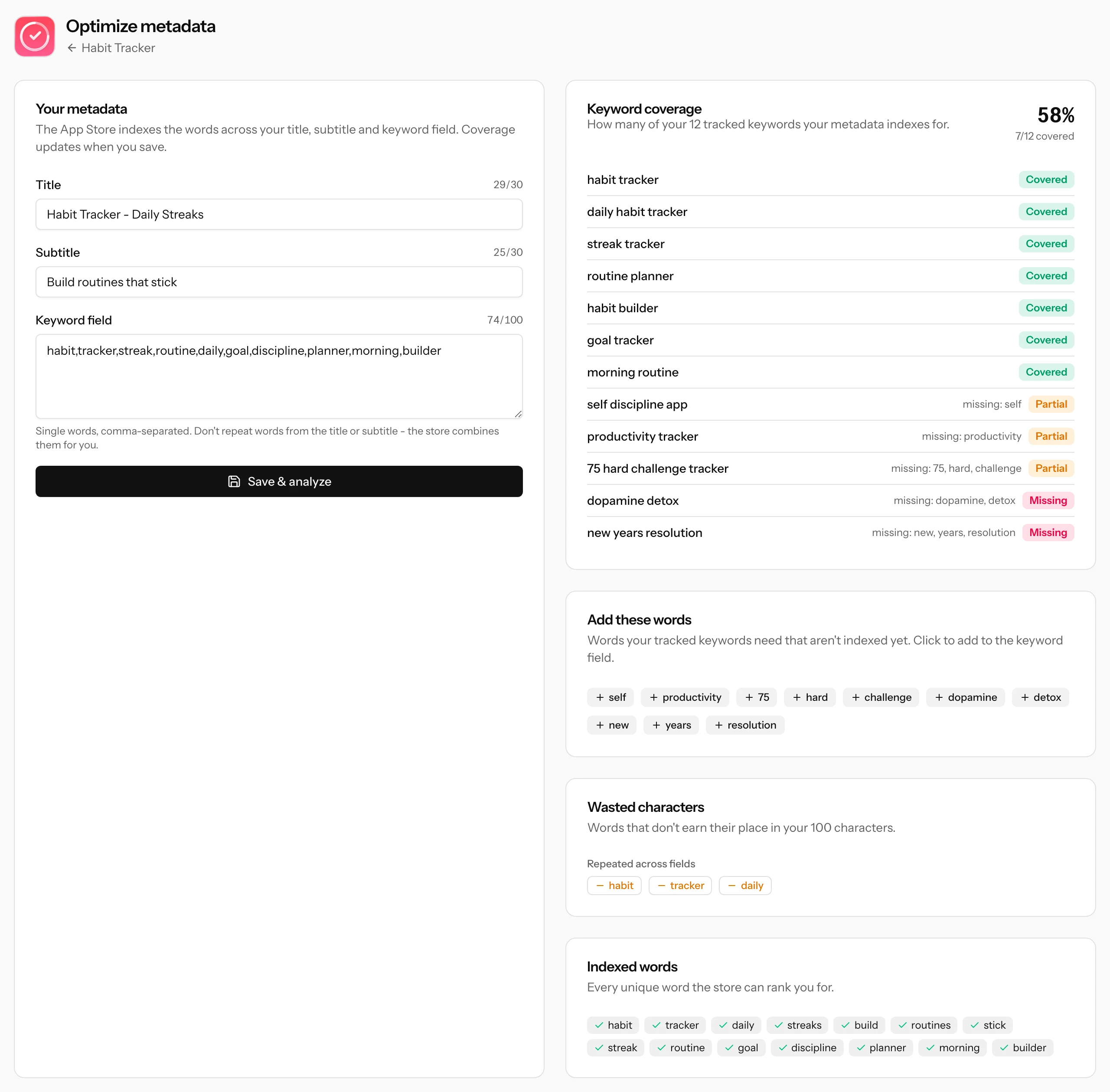
How the App Store reads your metadata
The store does not rank you for fields, it ranks you for words. It takes every word across your title, subtitle and keyword field, drops common stop words (including "app" itself), de-duplicates, and combines the remaining words into phrases. Two consequences matter:
- Repeating a word across fields buys you nothing. "Habit" in the title and "habit" in the keyword field is the same indexed word once, and the second copy is pure waste.
- You cover phrases you never wrote. If "habit" is in your title and "tracker" is in your keyword field, you are indexed for "habit tracker" without spelling it out anywhere.
The optimizer analyzes your draft exactly this way, so what it reports is what the store will actually index.
The editor and Apple's limits
Each field shows a live counter against its limit: 30 for the title, 30 for the subtitle, 100 for the keyword field. Go over and the counter turns red. For the keyword field, use single words separated by commas, and skip the spaces after commas: they count against the 100 characters and add nothing.
Hit Save & analyze and every panel recalculates against the saved draft.
Wasted characters
The analysis flags the two classic ways a keyword field leaks characters:
- Repeated across fields: words that appear more than once anywhere in your metadata. Remove the copy from the keyword field and spend those characters on a new word.
- Ignored by the store: stop words sitting in the keyword field ("and", "for", "your", "app"). The store skips them entirely, so they only shrink your budget.
Plurals are handled for you in the coverage check: "tracker" and "trackers" count as the same word, so you never need both. Keep the shorter one.
Keyword coverage
The coverage panel takes every keyword you track for this app and checks whether your draft indexes it:
- Covered: every word of the keyword is somewhere in your metadata. You are eligible to rank for it.
- Partial: some words are there, some are missing. The missing ones are listed right on the row.
- Missing: none of the keyword's words appear. As long as that stays true, no rank tracking miracle will happen for this term.
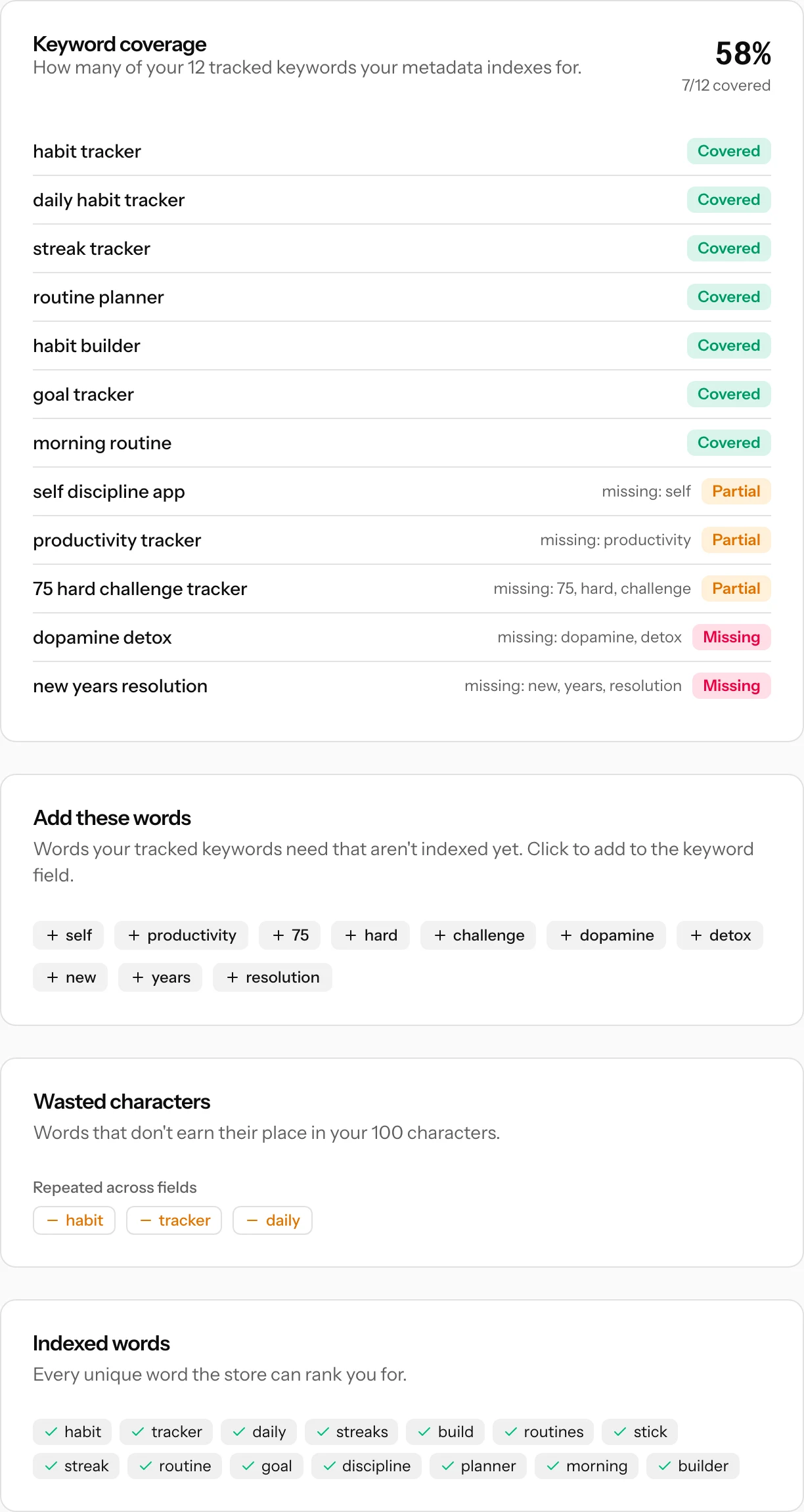
Below it, Add these words lists the exact words your tracked keywords still need, ranked by how many keywords each one would help. Click a word and it is appended to your keyword field. The Indexed words panel at the bottom is the ground truth: every unique word the store can currently rank you for.
Drafts vs. what's live
What you save here is a draft inside ASO Atlas. It does not touch your App Store listing. The title starts pre-filled from your live app name; subtitle and keyword field start empty because Apple does not expose the keyword field publicly (nobody's tool can read it, including your competitors').
To ship the draft, copy the fields into App Store Connect and submit an app update. Metadata only changes with a new version, so plan keyword changes to ride along with your releases.
The loop that makes it work
- Research: find terms worth targeting with keyword research and Best opportunities, and track them on your app.
- Draft: work the winners into the title, subtitle and keyword field until coverage is high and waste is zero.
- Ship: submit the update in App Store Connect.
- Measure: once the update is live, ASO Atlas detects the listing change and marks it on your ranking history charts, so every rank move after it has a visible cause.
Then repeat. Each cycle, drop the keywords that went nowhere and spend their characters on the next candidates. Keyword history keeps the record of what you already tried, and warns you here when you type a dropped keyword back in.