DocsFeatures
Best opportunities
Which keywords should you work on next? How ASO Atlas surfaces the searches with real demand, beatable competition and room to climb.
Most keyword lists tell you where you stand. The Opportunities view answers the more useful question: what should you work on next? It picks out the keywords where the numbers line up in your favor, so you spend your limited metadata characters where they can actually move installs.
What makes a keyword an opportunity
A keyword is worth acting on when three things are true at once:
- People search it. Popularity is real demand. A keyword nobody types is free to rank for and worth nothing.
- You can win it. Difficulty measures how strong the apps already ranking are. A popular keyword owned by giants is not an opportunity, it is a wall.
- There is room to climb. A keyword you already own at #1 has no upside left. The biggest wins hide in keywords you barely rank for, or do not cover at all.
The best opportunities score well on all three: meaningful demand, competition you can realistically beat, and headroom between where you are and the top of the results. That same blend drives the opportunity verdict you see on every researched keyword.
Where to find it
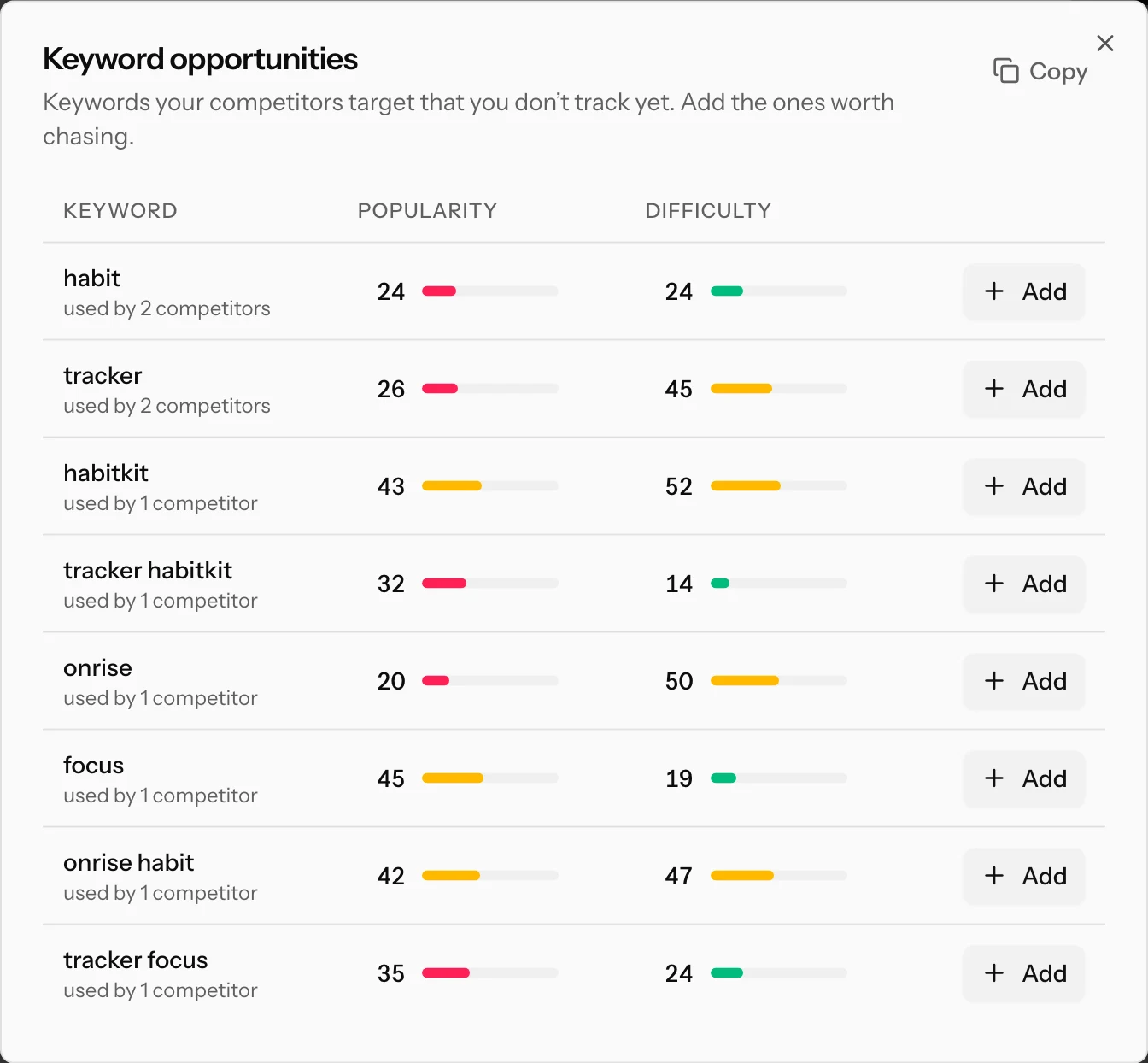
Open any tracked app and look at the header of the Tracked keywords card. The Opportunities button carries a count of suggestions waiting for you; click it to open the list.
The suggestions come from your competitors: these are keywords the apps you compete with target in their listings that you are not tracking yet. That is a strong relevance filter. If several rivals put a phrase front and center, they have usually done the homework, and their users are searching it.
Reading the list
Each suggestion shows everything you need for a quick decision:
- Popularity and difficulty bars, the same 0-100 scores as everywhere else in ASO Atlas. Popularity marked as verified comes from real Apple search data; the rest is our honest estimate.
- How many competitors use it. "Used by 3 competitors" means three of your tracked rivals consider this phrase worth their title or subtitle. More competitors means more validated demand, but often more difficulty too.
- New suggestions may briefly show loading bars while their scores are computed; they fill in within a minute.
The sweet spot to scan for: popularity comfortably above the noise floor (say 25+), difficulty clearly below it, and a phrase that genuinely describes your app. A high-popularity, high-difficulty keyword used by every competitor is a long-term project; a moderate keyword with weak competition is something you can win this month.
What to do with an opportunity
- Add it. One click on Add starts tracking the keyword for this app. Its rank gets checked immediately and then daily, so you get a baseline before you change anything. See rank tracking for how the history works.
- Work it into your metadata. A keyword you never mention is a keyword you will not rank for. The metadata optimizer shows which tracked keywords your title, subtitle and keyword field already cover, and where the gaps are.
- Watch the chart. After you ship the change, the ranking trend tells you within days whether the bet paid off. If it did not move after a few weeks, take the characters back and spend them on the next candidate.
Not every suggestion deserves a slot. Skip keywords that misdescribe your app, no matter how good the numbers look: ranking for a search you cannot satisfy earns impressions, not installs. If you want a repeatable way to make these calls, read how to pick keywords.
Keep the list fresh
The suggestions are only as good as the competitors behind them. Track the two or three apps you actually lose installs to, not just the category leaders, and the gap between their keywords and yours becomes a steady source of ideas. Every keyword you add disappears from the list, so a shrinking count is a sign you are working through it.
Where to go next
- The opportunity verdict: how demand, difficulty and relevance fold into one call.
- How to pick keywords: the full decision framework.
- Metadata optimizer: turn the keywords you chose into better metadata.