DocsFeatures
Competitor tracking
Track rival apps beside your own: see the keywords they target that you miss, get alerted to their metadata changes, and mine the gap for ideas.
Your competitors have already done keyword research. Every phrase they put in their store listing is a bet they made with real money on the line, and you can read those bets for free. Competitor tracking attaches a few rival apps to each of your tracked apps and turns their choices into a steady source of keyword ideas.
Adding competitors
Open your app under Apps and switch to the Competitors tab. Type a name into Find a competitor app and hit Search: you get live App Store results from the same storefront your app is tracked in, each with an Add button. One click and the rival joins your list; the trash icon removes it again. The only app you cannot add is your own.
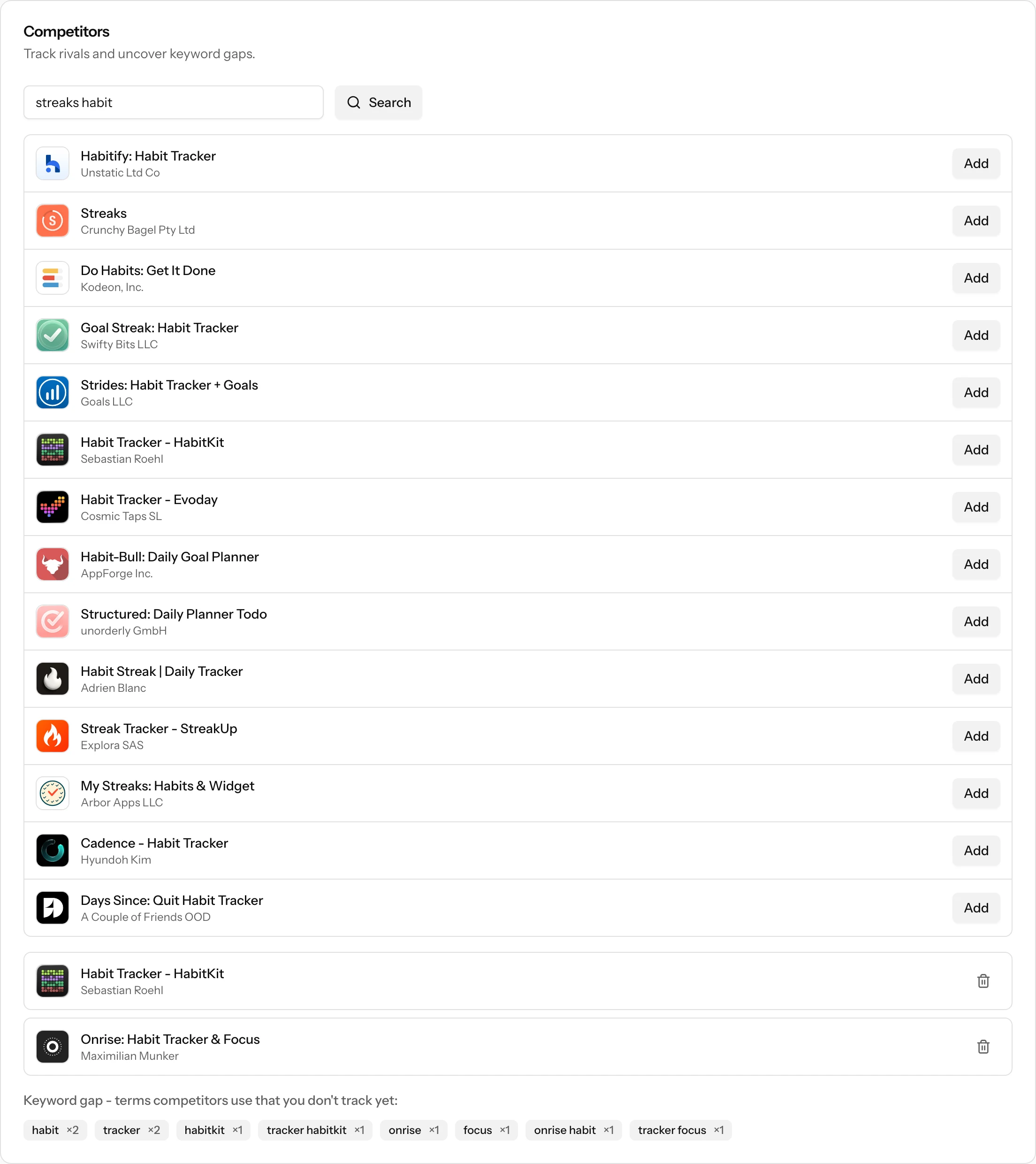
Competitors are per app and per country. If you track your app in two storefronts, each tracked app keeps its own competitor list, because the rivals that matter in the US are rarely the same ones that matter in Japan.
What you get from a tracked competitor
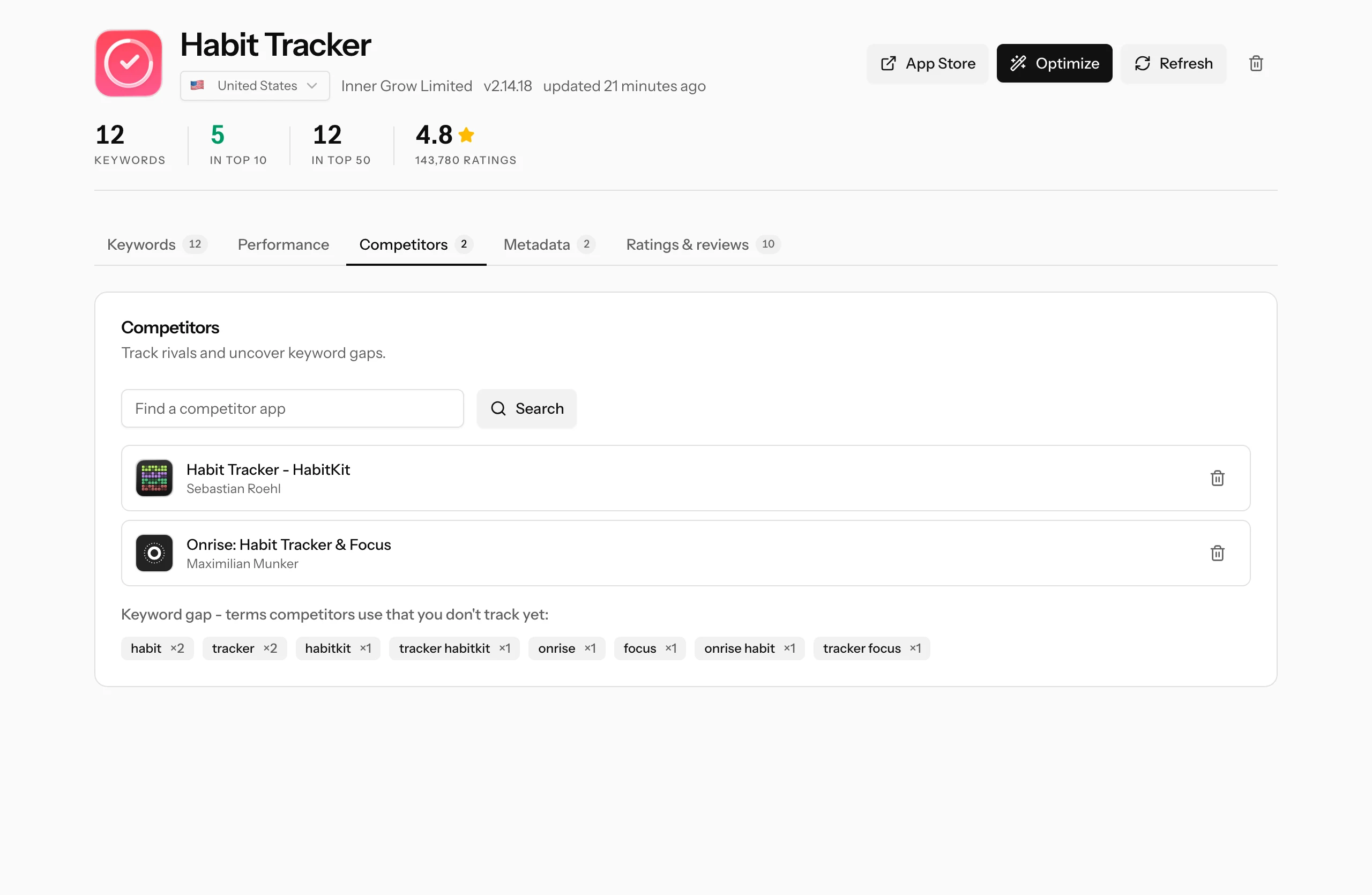
- The keyword gap. ASO Atlas pulls the meaningful words and two-word phrases out of each competitor's listing name, counts how many of your rivals use each one, and shows you the ones you are not tracking yet. That is the "Keyword gap" row of chips at the bottom of the tab.
- Opportunity suggestions. The same gap feeds the Opportunities dialog on the Keywords tab, where each suggestion carries popularity and difficulty scores and a one-click Add. See Best opportunities for how to read that list.
- Metadata change alerts. The Metadata tab logs title, icon, description, version and price changes for your app and every competitor you track. When a rival reworks their title, you find out on your next visit instead of months later.
Reading the keyword gap
Each chip is a term at least one competitor uses in their listing that you do not track. The multiplier is the count: habit ×2 means both of your tracked rivals use it, which is stronger validation than a term only one of them bets on.
Clicking a chip opens keyword research for that term in your app's country, so the next step is always the same: check its popularity, difficulty and verdict before spending anything on it. A gap term is a lead, not an order. Some are brand fragments of the competitor's own name (you will recognize them instantly) and are only worth tracking if you want to monitor that brand's search results, as described in rank tracking.
Picking whom to track
The quality of everything above depends on this choice. Two rules:
- Direct alternatives beat giants. Track the apps a user would actually install instead of yours, not the household names at the top of the category. A giant's listing is full of brand terms and keywords they win on reputation alone; the gap it produces is a list of walls. A peer at your size targets keywords you can realistically contest.
- Two or three well-chosen rivals beat ten. The gap counts how many competitors use each term, and that signal only means something when every app on the list is genuinely fighting for your users. Padding the list with loosely related apps dilutes it into noise.
A good starting point: search your own most important keyword and add the apps ranking just above you. Those are the competitors whose homework is most worth copying, and the ones whose metadata changes should interest you most.
Where to go next
- Best opportunities: the gap keywords ranked and scored, ready to add.
- Rank tracking: watch your position against those rivals every day.
- How to pick keywords: deciding which gap terms deserve a slot in your metadata.