DocsFeatures
Connect your AI to ASO Atlas
ASO Atlas ships an MCP server, so ChatGPT, Claude, Codex, Cursor and any other MCP client can research keywords and act on your account.
ASO Atlas is available inside your AI assistant. The web app exposes an MCP (Model Context Protocol) server, an open standard that ChatGPT, Claude, Claude Code, Codex, Cursor, VS Code, Hermes Agent and a growing list of tools speak natively. Once connected, your assistant can list your tracked apps, read positions and opportunities, research any keyword in any storefront, pull your App Store Connect performance, and take safe actions such as adding keywords or saving a metadata draft, all mid-conversation.
The server URL is the same for every client: https://asoatlas.com/mcp. You will find it, together with everything on this page, under Settings → Connect your AI. An active subscription is required.
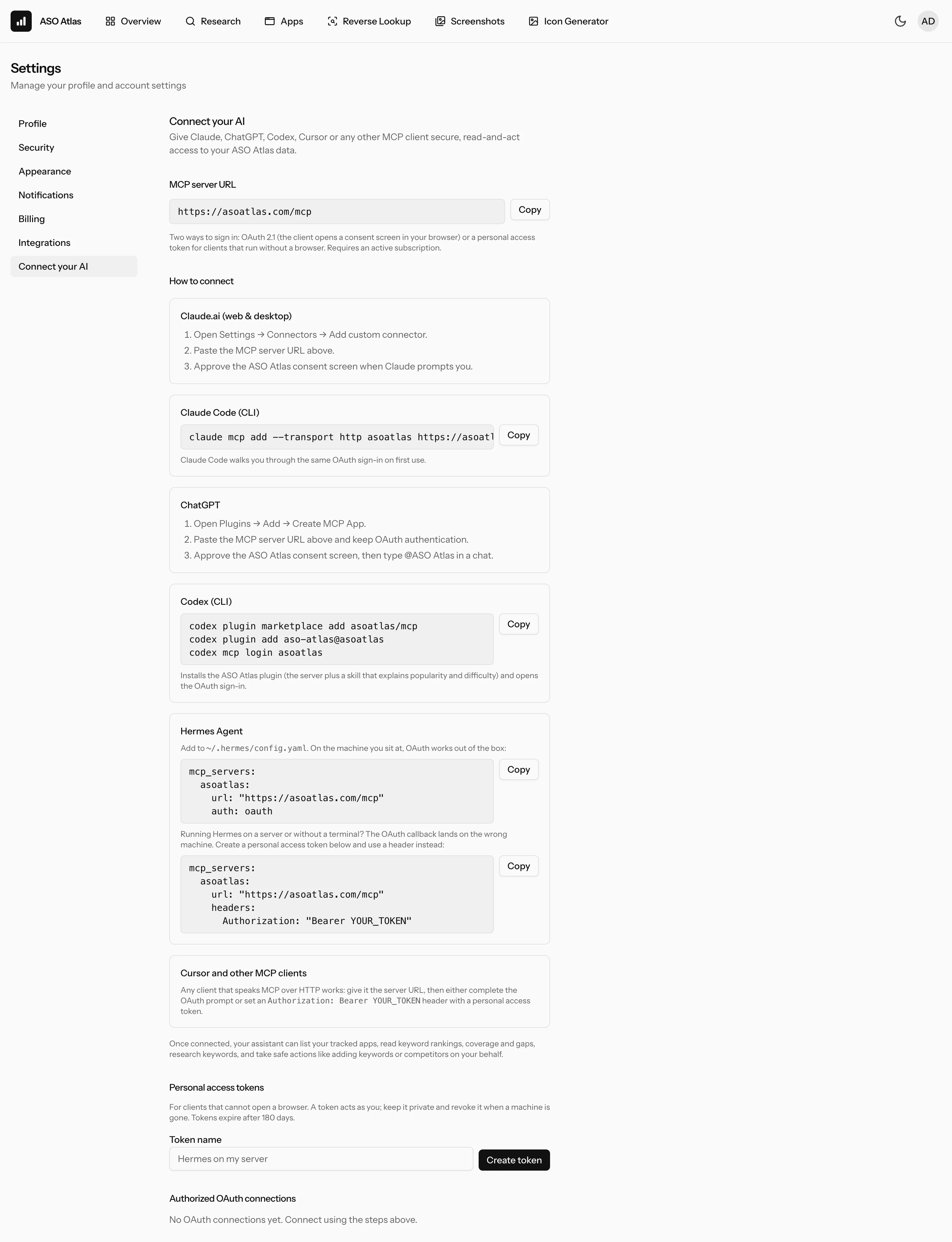
Two ways to sign in
- OAuth: the client opens an ASO Atlas consent screen in your browser, you approve, done. Best for anything running on the computer you are sitting at. Connections appear under Settings → Connect your AI and can be disconnected there at any time.
- Personal access token: a secret you create once and paste into the client's config as a header. Made for assistants that run on a server, in a container or without a terminal, where the OAuth callback cannot reach the machine that opened the browser. A token acts as you, is shown only once, expires after 180 days, and can be revoked at any time.
Claude
In Claude.ai (web or desktop) open Settings → Connectors → Add custom connector, paste the server URL and approve the consent screen. In Claude Code run:
claude mcp add --transport http asoatlas https://asoatlas.com/mcp
Claude Code opens the same consent screen on first use.
Hermes Agent
Add the server to ~/.hermes/config.yaml. On your own machine, OAuth works out of the box:
mcp_servers:
    asoatlas:
        url: 'https://asoatlas.com/mcp'
        auth: oauth
If Hermes runs on a remote host or as a bot without a terminal, the OAuth redirect lands on the wrong machine and the sign-in never completes. Create a personal access token under Settings → Connect your AI and use it as a header instead:
mcp_servers:
    asoatlas:
        url: 'https://asoatlas.com/mcp'
        headers:
            Authorization: 'Bearer YOUR_TOKEN'
Restart Hermes and the ASO Atlas tools appear in its tool list.
Cursor
Click Add to Cursor or add the server to ~/.cursor/mcp.json:
{ "mcpServers": { "asoatlas": { "url": "https://asoatlas.com/mcp" } } }
Cursor opens the consent screen on first use.
ChatGPT
In ChatGPT open Plugins, click Add → Create MCP App, name it ASO Atlas, paste the server URL with OAuth authentication and confirm. ChatGPT opens the ASO Atlas consent screen; approve it. In a chat, type @ASO Atlas or pick it from the plus menu to use it.
Codex
Install the ASO Atlas plugin, which adds the server together with a skill that teaches Codex how to read popularity and difficulty, then sign in:
codex plugin marketplace add asoatlas/mcp
codex plugin add aso-atlas@asoatlas
codex mcp login asoatlas
To add only the server, put this in ~/.codex/config.toml and run codex mcp login asoatlas:
[mcp_servers.asoatlas]
url = "https://asoatlas.com/mcp"
VS Code
code --add-mcp '{"name":"asoatlas","type":"http","url":"https://asoatlas.com/mcp"}'
Other clients
Any client that supports MCP over HTTP works the same way: give it the server URL, then either complete the OAuth prompt it shows or configure an Authorization: Bearer YOUR_TOKEN header with a personal access token. Most clients take a JSON or YAML block with a url and an optional headers map; check the client's own MCP documentation for the exact file.
Where to find ASO Atlas
The server is listed in the official MCP Registry as com.asoatlas/mcp, on Smithery and on Glama. The public manifests, a plugin for Claude Code and Codex that bundles the server with a skill, and an Agent Plugin for Cursor live at github.com/asoatlas/mcp:
claude plugin marketplace add asoatlas/mcp
claude plugin install aso-atlas@asoatlas-mcp
What your assistant can do
The server exposes read tools and action tools. Reading covers your dashboard, each tracked app with its keywords and positions, keyword research with popularity, difficulty and the apps ranking today, keyword suggestions, keyword lists, your App Store Connect performance series when that account is connected, and the keyword history of your own apps, so an assistant knows which keywords you already tested before it suggests new ones. Actions cover tracking or untracking an app, adding and removing keywords and competitors, changing an app's market, refreshing positions, saving a metadata draft, noting whether a keyword is worth testing again, and managing keyword lists. Everything is scoped to your own account; an assistant cannot see or touch anyone else's data.
Staying in control
- Every connection and token is listed under Settings → Connect your AI with when it was created, when it was last used and when it expires.
- Disconnecting an OAuth connection or revoking a token cuts access immediately.
- Changing your password signs out every connected client and token as well.
- Treat a personal access token like a password: never paste it into a shared chat or commit it to a repository. If in doubt, revoke it and create a new one.
Troubleshooting
- The client keeps asking me to sign in: the OAuth callback is not reaching the client. This is typical for remote hosts; switch to a personal access token.
- 401 Unauthorized with a token: the token was revoked or has expired, or the header is missing the word
Bearer. Create a fresh token and paste the whole line. - 402 Payment Required: the account has no active subscription. See plans and billing.
- Too many registration attempts: a client that retries in a loop can hit a registration limit for about an hour. Fix the callback or use a token, then try again.
Where to go next
- Quick start: set up your account, first app and first keywords.
- Keyword research: what the numbers your assistant reads actually mean.