DocsFeatures
Alerts on your events
Get an email and a webhook call when one of your app's events drops, spikes or stops arriving, with your own threshold for each rule.
App analytics already warns you when a whole app stops sending, a new version does worse or installs spike. Your own rules go one level down, to a single event: tell ASO Atlas that habit_completed matters, and you hear about it the morning after it falls, instead of at the end of the month.
Create a rule
Open the Events tab, click the event and press Alert me in its drawer. Pick what to watch for:
- Drop: the day's count fell by at least the threshold against the usual day. From 10% to 100%.
- Spike: the day's count rose by at least the threshold. From 10% to 1000%.
- Stopped: no events of it arrived for 24 hours. It has no threshold.
Set the percentage after by and press Alert me. An event has at most one rule of each kind: picking a kind it already has changes that rule, and the button says Update. Each rule shows in the drawer with a bin to delete it.
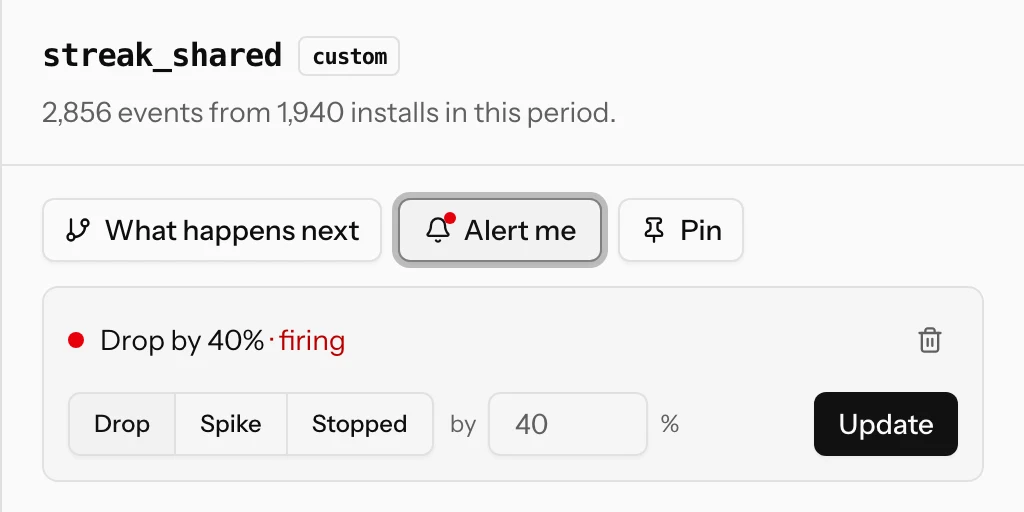
In the event list, a bell marks an event with a rule and a red dot one whose rule is firing. An app can hold up to 20 rules.
When a rule is judged
Drop and spike are judged once a day, early in the morning UTC, on the previous full UTC day. The usual day is the median of the 7 days before it, so one odd day in the week does not skew it. Stopped is checked every hour.
A rule only judges an event busy enough to judge: the usual day must reach its minimum, 50 events by default (the list in Setup shows it as "min 50/day"). A rare event would otherwise fire on every quiet day. Stopped also needs at least 10 events actually collected on the usual day, so a sampled app does not mistake a quiet day for a broken build. Your AI assistant can change the minimum per rule.
Counts are the same as on the Events tab, scaled back up when the app is sampled, and debug builds never count. Nothing is judged while the app is paused, has reached the month's allowance or has analytics turned off, and a day on which events were dropped at the cap is skipped, so a rule never fires because of your own limits. If the whole app goes quiet, the app-wide Events stopped alert speaks instead of every stopped rule at once.
What you get
A rule fires once and then waits: it shows as firing until the event is back to normal, recovers quietly, and can fire again only after that. Each firing sends:
- An email with the event, the change in percent and the usual day it was compared with, linking to the event on the Events tab. Turn analytics emails off under Settings → Notifications → Analytics alerts.
- A webhook call to the app's feedback webhook if it has one, as the
analytics.event_ruleevent, also posted to Slack or Discord as one readable line. The payload is described in the feedback API.
Manage every rule in one place
The app's Setup tab lists all its rules under Alerts, with how many are firing. Each row can switch kind, change the threshold, turn the rule off without deleting it, or delete it, and shows the minimum and when it last fired. Click the event name to open it on the Events tab. With analytics turned off the rules stay on the Setup tab and can still be changed or deleted; they start being checked again when you turn it back on.
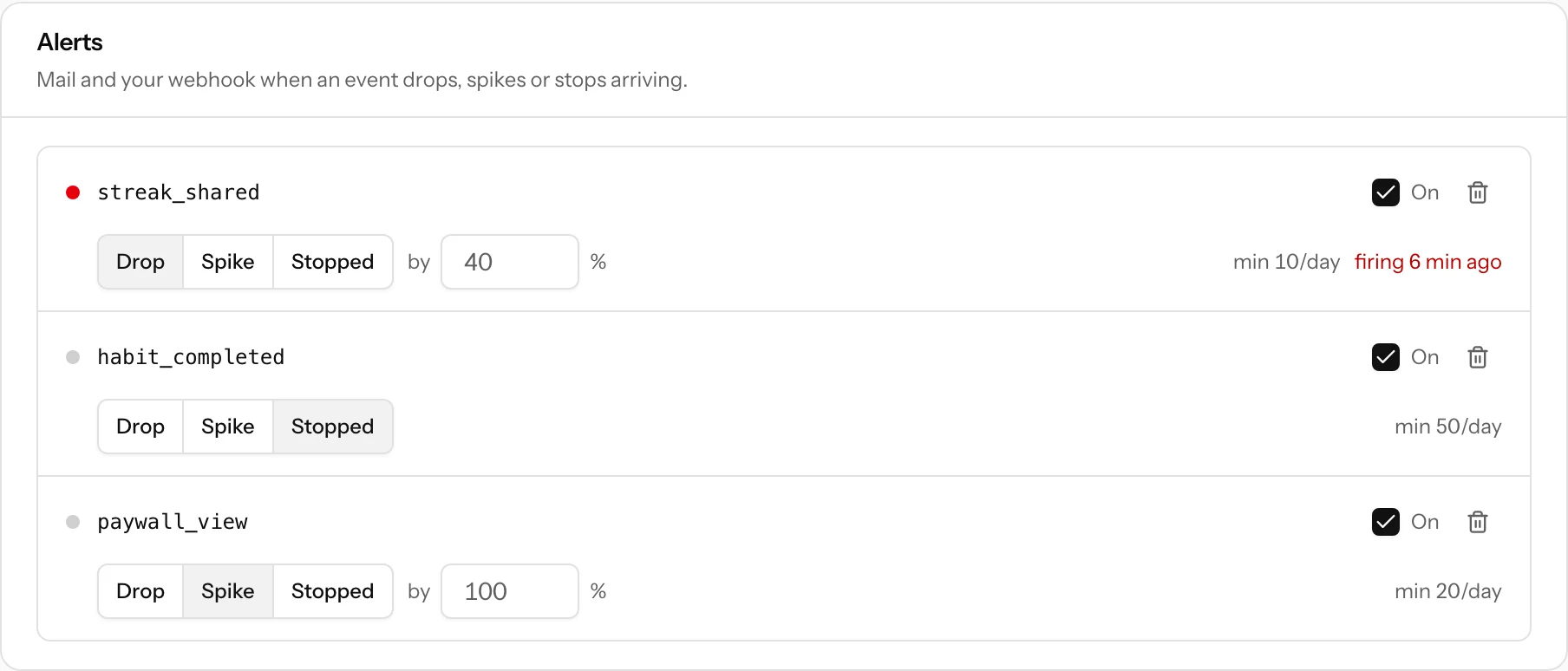
A connected AI assistant can list, create, change and delete rules too, for example "alert me if paywall_view drops by 30%".
Good rules to start with
- Stopped on your most important feature event: the fastest way to learn that a release broke tracking or the feature itself.
- Drop of 30 to 50% on the event that means a user got value (
entry_logged,photo_exported). - Spike on an error or cancellation event, such as
export_failedorsubscription_cancelled.