DocsFeatures
Overview and saved views
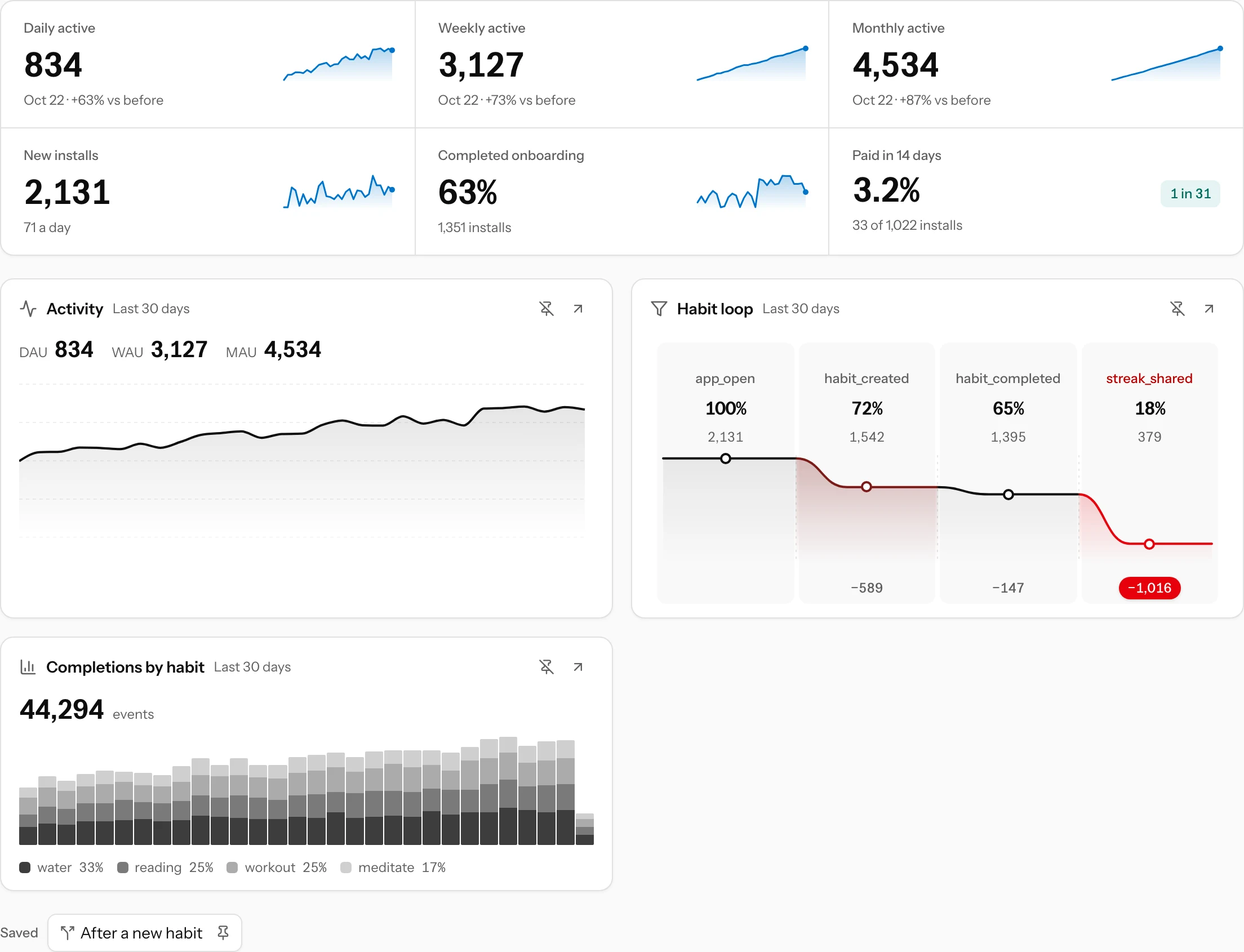
The Overview tab of app analytics shows active installs, onboarding and paid at a glance, then a dashboard of the funnels, trends and paths you pinned.
The Overview is where an app opens under Analytics. On top it answers "how is the app doing", under it sit the charts you care about most, each pinned from the tab it came from. It needs nothing beyond the events your app already sends for app analytics.
The headline
Six panels, the first five with a sparkline over the period:
- Daily active, Weekly active and Monthly active: installs that sent at least one event on the last full day, in the 7 days or in the 28 days up to it, with the change against the period before. They are explained in Activity.
- New installs: first opens in the period, with the daily average.
- Completed onboarding: the share of those installs that finished onboarding.
- Paid in 14 days: the share that paid within 14 days of the first open, over the installs old enough to have had that time, with "1 in 31" to picture it.
The filter bar above applies to the headline, except that active installs ignore the version, country, experiment and segment filters (a line under the panels says so). Pinned cards keep their own filters and period, so changing the period on top never changes what a card shows.
Saved views
A view is a chart you saved with its filters and period. There are five kinds:
| Kind | Card | Where you save it |
|---|---|---|
| Funnel | The funnel line with drops in red | Save on a funnel of your own (Funnels → + New funnel) |
| Daily events | Bars per day, stacked by a prop when split | Pin in an event's drawer on the Events tab |
| Paths | What installs did after an event | Pin on the Paths page |
| Retention curve | Day 1 to day 30 | A suggestion, or your AI assistant |
| DAU, WAU and MAU | The active installs line | A suggestion, or your AI assistant |
A period that ends today is saved as its length, so a "last 30 days" card moves with the days. A view saved without a period uses the report's own: 90 days for retention, 30 for the rest.
Pinning and unpinning
Every card has two buttons in its corner: the crossed pin takes it off the Overview, the arrow opens its full page with the view's filters (a funnel opens in the funnel editor, a paths card on the Paths page). Views you saved but did not pin wait in the Saved row under the cards; click one to open it, or its pin to put it back. An app holds up to 30 saved views, 12 of them pinned.
When nothing is pinned yet, the Overview offers three views to start from: active installs, the retention curve and the daily count of your busiest custom event, each pinned with one click.
Each card loads on its own, so a slow or broken one never holds up the rest.
Removing a view
Delete a funnel from its editor with the bin next to Save. Other views stay in the Saved row once unpinned; a connected AI assistant can list, rename, change or delete any of them, which is also the quickest way to tidy up many at once: ask it to "delete every saved view except the habit loop".