DocsFeatures
In-app feedback
Collect feedback conversations with screenshots and logs from your app's users, answer them in ASO Atlas and ask resolved users for a store review.
Most users who hit a problem never write to you. They leave, or they leave a one-star review. Feedback gives them an easier way to reach you: a button in your app that opens a conversation, with screenshots, logs and the device details you would otherwise have to ask for. Their messages land in ASO Atlas next to your keywords and reviews, you answer from one inbox, and once the problem is fixed you can ask that person for a review.
There is no SDK to install. You either link to a hosted form that needs no code at all, or call a small HTTP API from your own code. The setup page gives you copy-paste examples for SwiftUI, Kotlin, Flutter, React Native and curl, and you own that code.
Turning it on for an app
Open Feedback in the top navigation and go to the setup page (/feedback/setup), or use the Feedback link in an app's header. Pick one of your tracked apps and click Enable feedback. The app gets its own inbox with:
- A publishable key (starts with
fk_). It is safe to ship inside your app: it can send feedback, never read it. If you ever need a new one, Issue new key gives you a fresh key and the old one keeps working for 7 days, so installed versions keep sending while the update rolls out. - A hosted form URL, ready to link to.
- Code examples with your key already filled in.
The iOS and Android versions of an app are separate inboxes with separate keys, because they live at different store addresses. Tracking or untracking a market never touches your conversations.
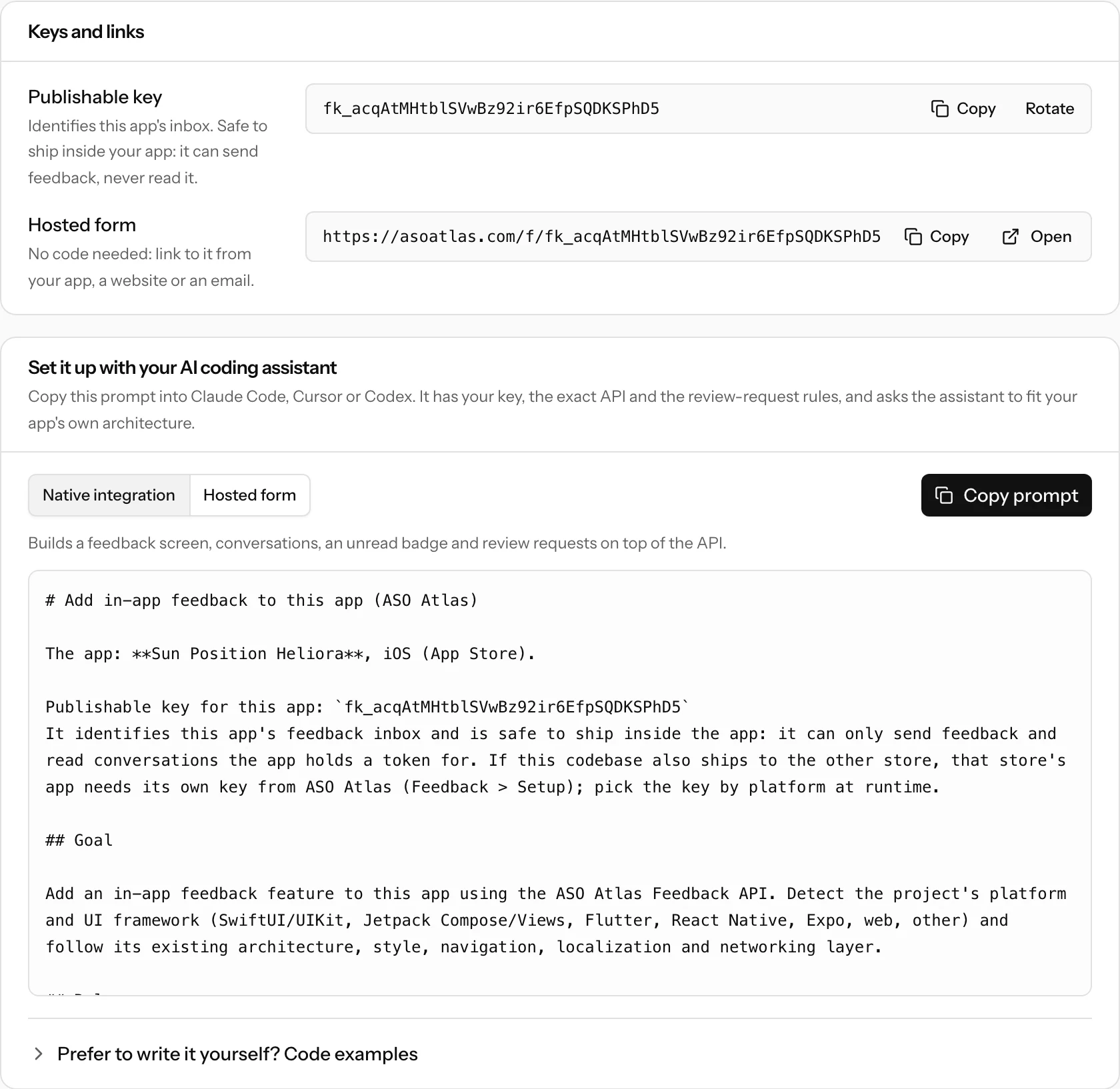
Verification: when your app name shows
Anyone can track any app, so ASO Atlas only puts your app's name and icon on the hosted pages once it knows the app is yours. An inbox is verified when the app belongs to your connected App Store Connect account (iOS) or linked Play Console (Android). This is checked when you enable feedback and again every day; Verify now checks right away. If your app sits in an account you have not connected, write to support and we can verify it by hand.
An unverified inbox still works through the API. Its hosted pages simply say "Feedback" instead of your app's name, which stops anyone from setting up a convincing "message the developer of a famous app" page.
The hosted form
The hosted form lives at https://asoatlas.com/f/ followed by your key. Open it in SFSafariViewController, a Custom Tab, a webview, or link to it from your website or support emails. Your users pick a category (bug, idea, question, praise, other), write a message, attach up to 5 screenshots and can leave an email so you can contact them.
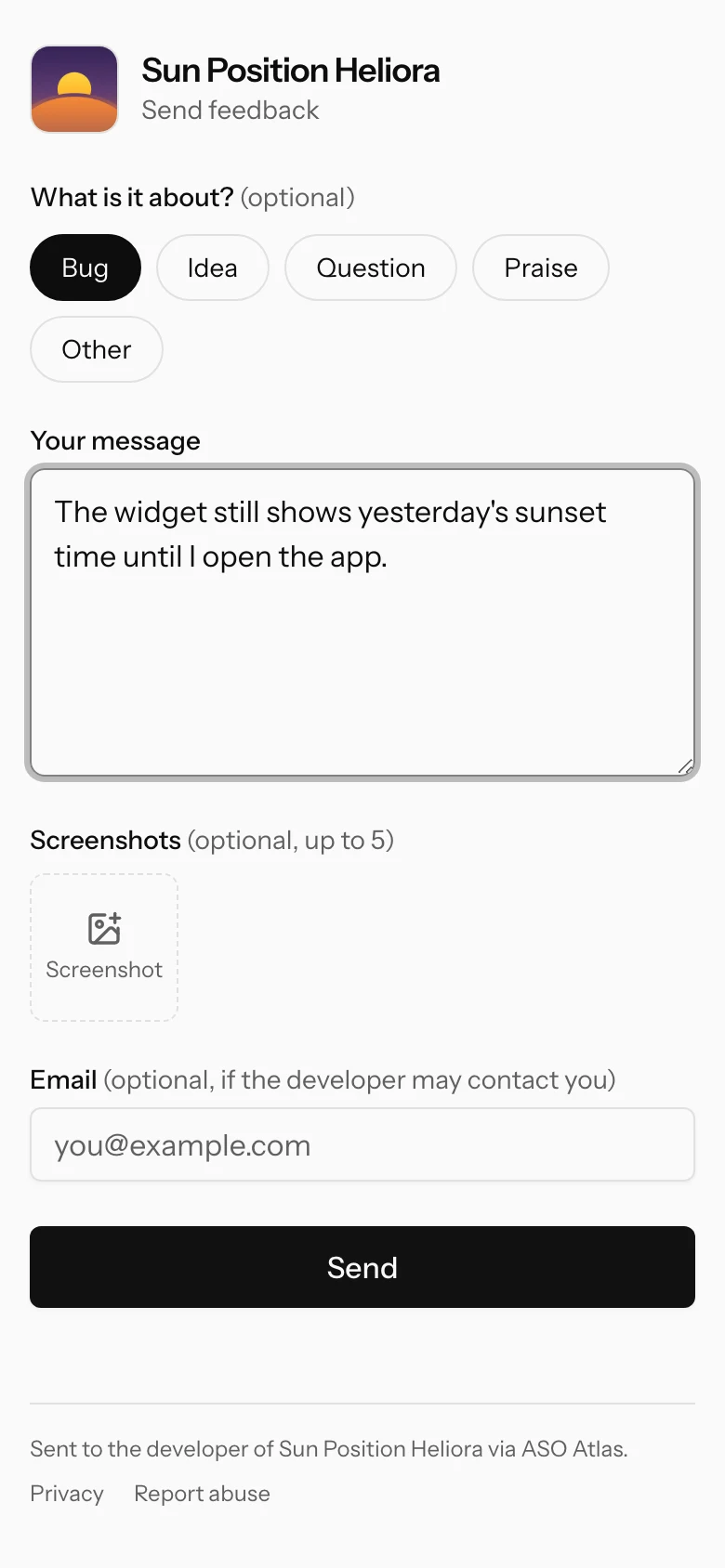
You can pass context as optional query parameters, and the setup page shows how: platform, v (app version), build, os, device, locale, iid (install id), uid (your user id) and uh (its identity hash, see the API reference).
The form refuses a message sent within 3 seconds of the page loading, or more than 24 hours after it loaded, and asks the user to reload and try again; it may also show a quick human check.
After sending, the user lands on their conversation page, which works like a private link: the page tells them to keep it, because it is the only way back. Your replies and review requests show up there (and in your app, if you built the conversation screens), they can answer, and Delete this conversation removes it for good.
Answering conversations
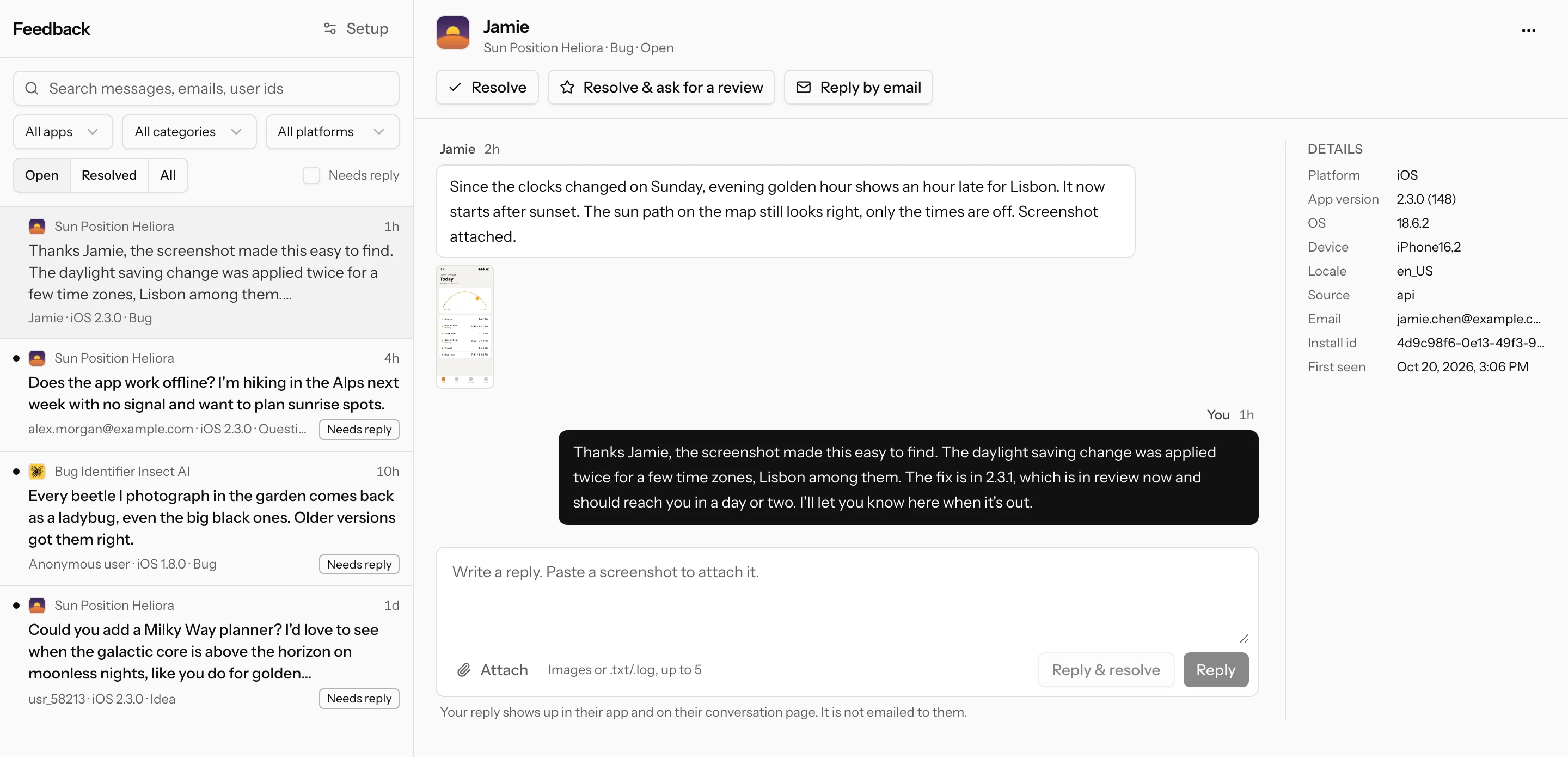
The Feedback inbox lists conversations from all your apps, with an unread count in the navigation. Filter by app, status, category, platform or needs reply (the last message is from the user), and search across messages, emails and user ids.
Each conversation shows the messages, the attachments (images open in a viewer, logs download) and a context panel: platform, app version and build, OS, device, locale, email, your user id and other conversations from the same person. From the conversation you can:
- Reply or Reply & resolve, with your own attachments. The reply shows up in their app and on their conversation page.
- Reply by email, when the user left an address: it opens your own mail app with the address and subject filled in, so the answer goes from your mailbox.
- Resolve, Reopen, or Resolve & ask for a review (below).
- Mark as spam: deletes the conversation and blocks the sender's install, email and user id. Their future messages never reach your inbox.
- Delete: removes the conversation and its files for good. Use it for data erasure requests.
A follow-up from the user reopens a resolved conversation.
Asking for a review
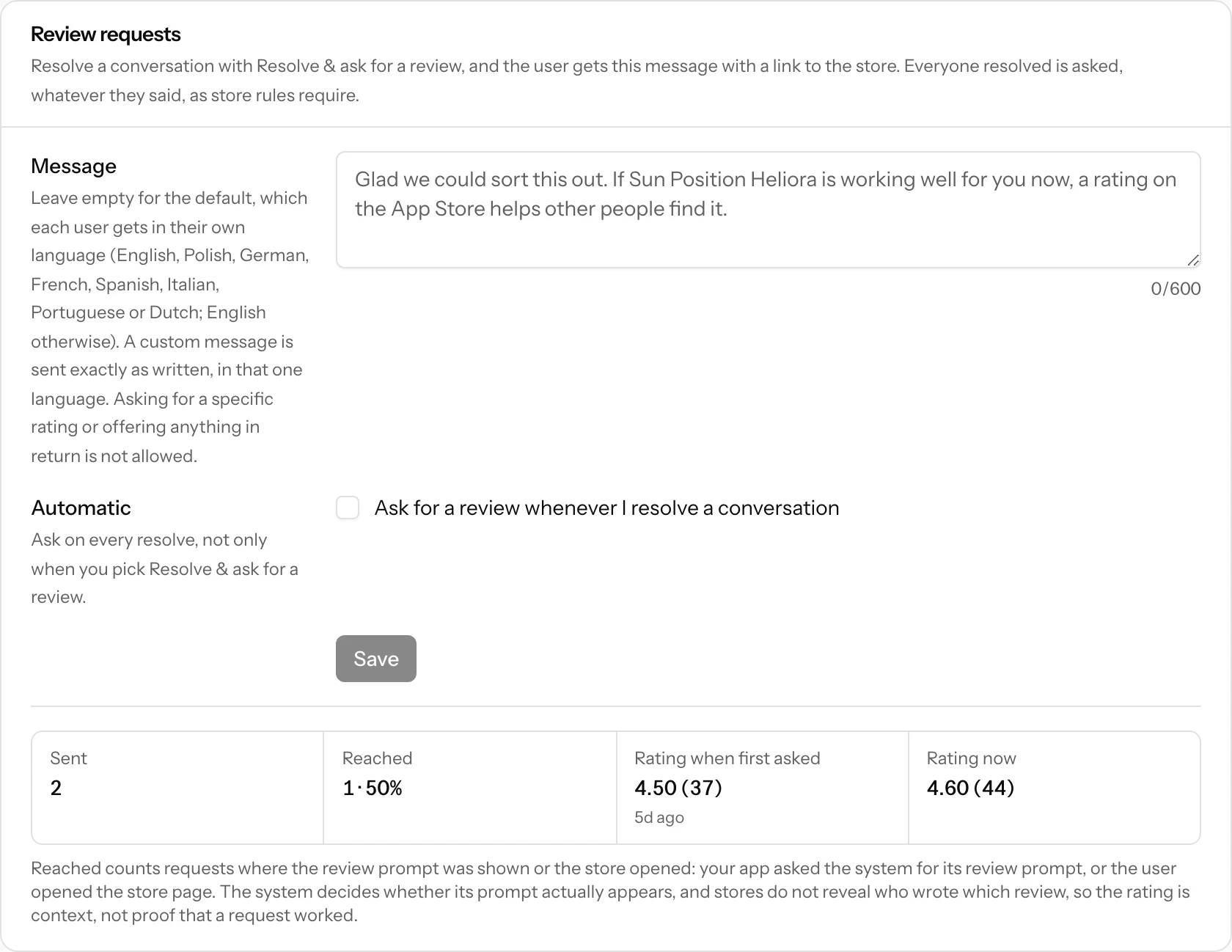
When a problem is fixed, the person who reported it is often happy to say so. Resolve & ask for a review resolves the conversation and adds a review request to it. In your app the request carries the store link, so you can show the native review prompt; on the hosted page it is a button to the store.
The rules follow App Store and Google Play policy, and ASO Atlas enforces them:
- Ask everyone, or no one. There is no filtering by sentiment. Turn on Automatic to ask on every resolve.
- No rating wording and no incentives. Your custom message cannot ask for a specific number of stars or offer a reward, discount, coupon or anything in exchange. Leave it empty for the neutral default, which each user gets in their own language (English, Polish, German, French, Spanish, Italian, Portuguese or Dutch, from the
localeyour app sends; English otherwise). A custom message is sent exactly as you wrote it, in that one language. - Not too often. One request per conversation, and one per person (same install, user id or email) every 90 days. The button tells you when it is blocked.
The review panel on the setup page shows requests Sent and Reached, plus your rating now versus when you first asked. A request counts as reached when the review prompt was shown or the store opened: your app asked the system for its review prompt, or the user tapped through to the store. iOS and Android decide on their own whether their prompt actually appears, and stores do not reveal who wrote which review, so treat both numbers as context, not proof.
Feedback only mode
Not every app needs a chat. If you just want to collect opinions, switch the app to Feedback only under Mode in the Status section of the setup page (the other choice, Conversations, is the default). The switch takes effect at once, also in app versions you already shipped: new feedback keeps arriving, but their conversation screens, replies and unread badge stop working (the API answers 409 replies_disabled). Conversations you already have stay readable for you in the inbox.
In feedback only mode:
- Users send feedback exactly as before, with a category, a message, screenshots and an optional email. The email now only means you may contact them; nobody gets an automatic email.
- There are no replies. The inbox hides the reply box and Resolve & ask for a review, and shows a note instead. When the user left an email, Reply by email opens your own mail app. Resolve, reopen, spam and delete work as usual, and resolving never sends an automatic review request.
- The hosted form thanks the user on the same page instead of opening a conversation. Old conversation links still open, read-only, with a note that replies are off; the user can still delete theirs. Feedback sent in this mode has no link, so a user who wants theirs erased asks you, and you delete it from the inbox.
- The API only takes new feedback. Creating feedback answers with
"mode": "collect"and no conversation token, and the endpoints for reading, replying and unread counts answer409 replies_disabled. See the API reference. - Setup gets simpler. Review requests and identity verification are hidden (their settings are kept for when you switch back), and the AI prompt and code examples become a send-only integration.
Notifications and webhooks
You get an email when new feedback or a follow-up arrives, batched over two minutes so a burst of messages is one email. Turn it off under Settings → Notifications → Feedback from your app's users.
For your own tools, add a webhook on the setup page: signed JSON for your server, or a readable message for a Slack or Discord channel (without the user's email). Events and signature checks are in the API reference.
ASO Atlas never emails your users: not a confirmation, not your replies, not review requests. Replies reach them in your app and on their conversation page. To answer someone by email, use Reply by email, which writes from your own mailbox.
Pausing, plans and limits
- Accepting feedback on the setup page pauses an inbox: new feedback is refused and the hosted form says you are not taking feedback. Existing conversations stay.
- If your plan ends, feedback keeps arriving so your app never breaks, but reading and replying need an active plan, and emails and webhooks stop. You get a short weekly reminder with counts only, at most 4 times. 90 days after the plan ends, new feedback is refused until you subscribe again. See plans and billing.
- Storage for attachments is 5 GB per account. Past that, messages still arrive but their files are not stored, and the message says so.
Manage it from your AI assistant
Once you connect your AI assistant (Claude, ChatGPT, Cursor and others), it can do everything on the setup page and in the inbox for you:
- Set up feedback: turn it on for a tracked app, change the mode, pause it, edit the review request message, turn automatic review requests on or off, and add, test or remove the webhook.
- Keys and secrets: issue a new publishable key, and create or remove the identity verification secret. A new webhook or identity secret is shown once, so store it right away.
- Verify ownership again, or delete an inbox (it asks for the app name first, like the setup page).
- Build the integration: ask it to add ASO Atlas feedback to your app and it fetches the same prompt the setup page shows, with your key filled in, then writes the code in your project.
- Work through conversations: read them, reply, resolve, ask for a review, mark spam or delete a conversation.
Your assistant should check with you before it sends anything to your app's users or deletes something; deleting an inbox or a conversation cannot be undone.
Privacy labels
What you declare depends on what your app sends. A typical setup:
| App Store label | When | Notes |
|---|---|---|
| Contact Info > Email Address | Users can leave an email | Optional for the user |
| Contact Info > Name | Your app sends name |
Optional |
| User Content > Customer Support | Always | The messages and attachments |
| Diagnostics > Other Diagnostic Data | You send version, OS or device | |
| Identifiers > User ID / Device ID | You send external_user_id / install_id |
Purpose: App Functionality. None of it is used for tracking. Mark data as linked to the user when you send your own user id or the person leaves an email; without either, nothing ties a conversation to an identity.
On Google Play's Data safety form the equivalents are Personal info (email address, name, user IDs), Messages (other in-app messages), Photos (screenshots), App info and performance (diagnostics) and Device or other IDs, collected for app functionality, encrypted in transit, not shared, and deletable by the user.
If your app is in the App Store Kids category or targets children on Google Play, keep the feedback entry point behind your parental gate, make the email field optional (or leave it out), send no identifiers your privacy declarations do not already cover, and check Apple's Kids category rules and Google Play's Families policy.
Retention and deletion
You are in charge of your users' feedback; ASO Atlas stores and processes it on your behalf. Conversations with no activity for 24 months are deleted automatically, files included. Users can delete their own conversation from the hosted page or your app (in feedback only mode there is no conversation link to do that from, so erasure requests come to you), you can delete any conversation, and deleting an inbox or your account deletes everything in it. The privacy policy explains this to your users, and the hosted pages link to it.