DocsFeatures
Activity, sessions and screens
How many installs use your app each day, week and month, how often and how long they open it, and which screens they spend their visits on.
The Activity tab of app analytics answers "is the app being used": how many installs are active, how sticky the app is, how long a visit lasts and which screens people go to. It is built from every event your app sends, plus two standard events the setup guide adds: screen_view and app_background.
Active installs
An install is active on a day when at least one of its events arrived that day (UTC). The line shows one of three counts for every day of the period, picked with the chips on top:
- DAU: installs active that day.
- WAU: installs active in the 7 days ending that day.
- MAU: installs active in the 28 days ending that day.
The numbers on the chips are the last full day. Today is left out of the line, because a day that has not ended always looks like a drop.
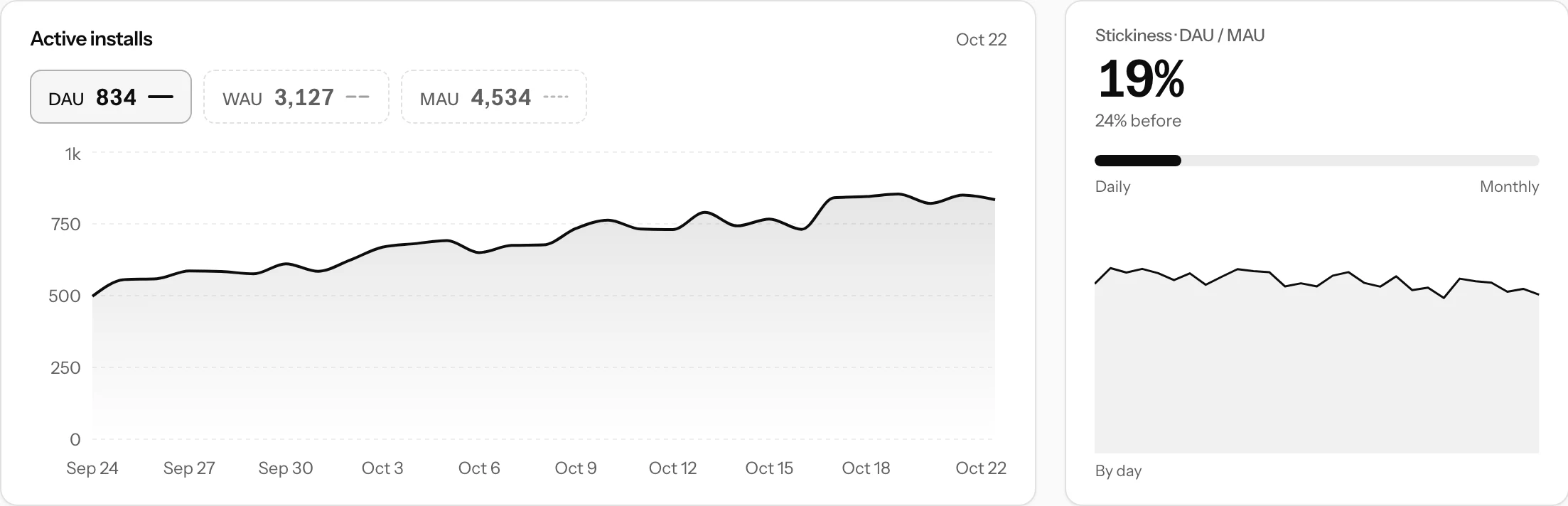
Stickiness is the mean DAU over the mean MAU of the period: the share of the month's users who open the app on a given day. A daily habit app aims high, a tool people open once a week sits low by design. The panel compares it with the period before and draws it day by day, so a release that made people come back less often shows as a step down.
Sessions
A session starts with app_open, or with any event more than 30 minutes after the install's previous one. It ends with app_background or after those 30 minutes without events. The time between two events of one session is session time, so a missing app_background never adds more than 30 minutes, but sessions look longer than they are until the app sends it.
- Sessions: sessions started in the period, with the daily average.
- Sessions per active install: sessions a day per install active that day.
- Session length: the mean time in the app per session.
- Screen views:
screen_viewevents in the period, and how many screens are listed below.
The first three panels carry a sparkline; sessions per active install and session length also show the change against the period before.
Screens
Every screen your app reports in screen_view is a bar: its views, its share of all screen views and a small chart of its daily views. The 20 busiest are listed. A screen too rare to make a day's top 50 is counted with the others like it as Other screens. A screen key like habit_detail is shown as "Habit detail".
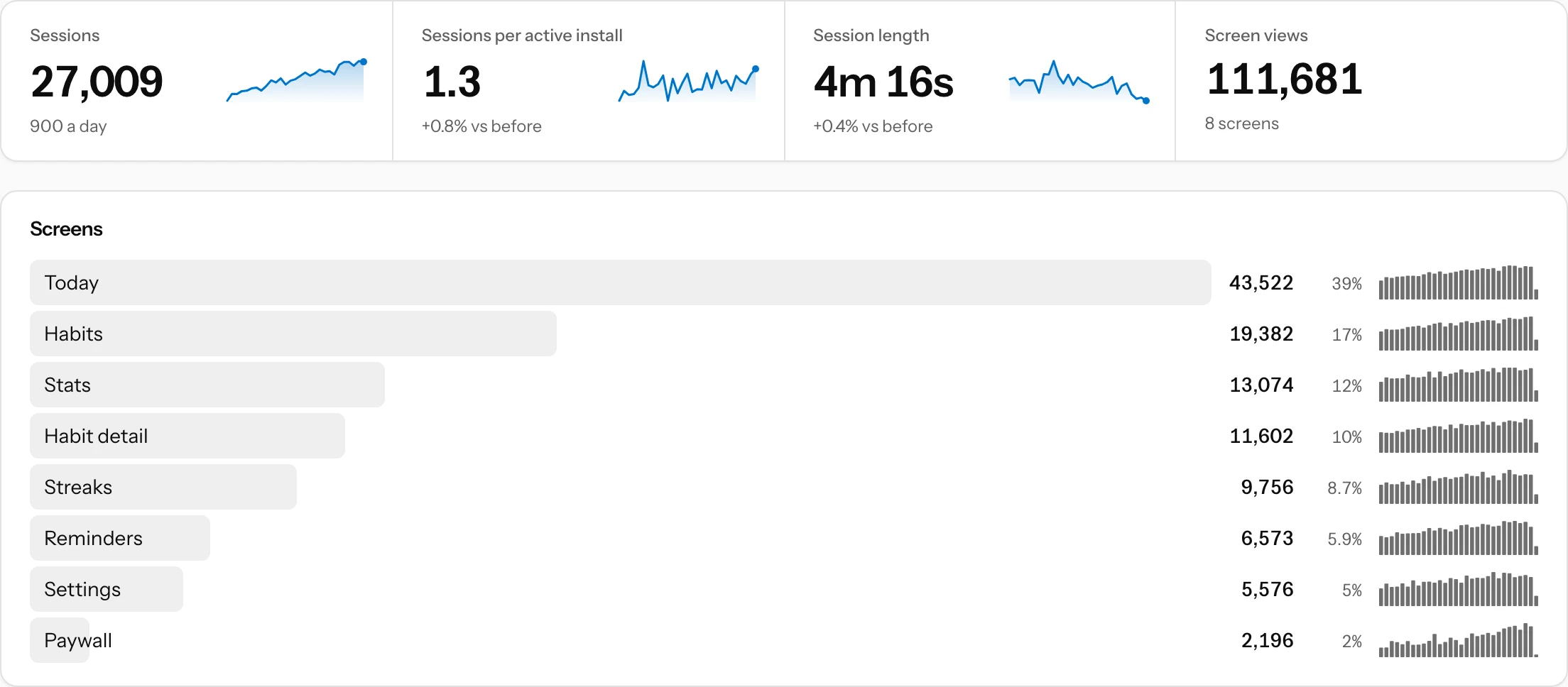
The screens your users visit most are the ones worth polishing first, and a screen that stays near the bottom may be hard to find. To see where people go after a given screen or action, open What happens next from that event on the Events tab.
Filters on this tab
Activity counts every install of the app, so the version, country, experiment and segment filters do not apply here; the page says so when one is set. The platform filter applies to the active installs and sessions; the screens always count every platform. When collection is sampled, every count is scaled back up and the page says "sampled".
Debug builds never count. Daily counts are kept for good, so the tab can show a whole year.
Pin it
DAU, WAU and MAU is one of the views the Overview suggests, so the active installs line can sit on the Overview next to your funnels, see Overview and saved views.